Home
ArchiCAD

BEST ARCHICAD ALTERNATIVES 2026

6 Best ArchiCAD Alternatives in 2026

By Altaf Ganihar, Founder and CEO at Snaptrude

The best ArchiCAD alternative in 2026 depends on the phase you work in. Snaptrude is the strongest pick for concept-to-schematic BIM. It runs in the browser on Mac, and its ArchiCAD export add-on (AC 26/27) means you can adopt it without leaving ArchiCAD. Vectorworks Architect ($1,530/yr) is the best Mac-native full replacement, Revit ($3,030/yr, Windows-only) is the documentation incumbent, and FreeCAD is the genuinely free option.

The problem

Why architects look for an ArchiCAD alternative in 2026

ArchiCAD earned four decades of loyalty as the design-first, Mac-friendly BIM platform. What changed is how you pay for it. Graphisoft has stopped selling new perpetual licenses. As of 2026, every new seat is a subscription:

  • Archicad Studio: $2,414/year per seat paid upfront (architectural design, local collaboration), or $345/month month-to-month.
  • Archicad Collaborate: $2,840/year per seat upfront (adds BIMcloud teamwork and MEP Designer), or $406/month month-to-month.
  • A 3-year term locks the price but locks you in too. Prices are before tax and vary by country and reseller.

For a firm that budgeted around a perpetual license plus occasional upgrades, that is a permanent $2,400–$2,840 per seat, every year, forever, and pricing decisions now sit inside the wider Nemetschek portfolio rather than with the Graphisoft of old. Add long-running Mac users' wariness about where the ecosystem is headed, and 2026 is the year many ArchiCAD firms are pricing the field before renewing. The good news: several credible alternatives cost less, and one of them doesn't require leaving ArchiCAD at all.

Side by side

Quick comparison

Tool
Best for
Price
Platform
Snaptrude
Browser BIM · Mac-friendly complement
Free; $60/mo Individual; $100/user/mo Organization
Browser: Mac, Windows
Vectorworks Architect
Native Mac BIM · Nemetschek sibling
$1,530/yr per seat; $153/mo monthly
Mac and Windows
Revit
Industry standard · Windows only
$3,030/yr standalone; AEC Collection $3,430/yr
Windows only
BricsCAD BIM
DWG-native BIM · has perpetual
From ~€1,060/yr; perpetual ~$1,890 (verify)
Windows, Mac, Linux
Allplan
Engineering-heavy BIM
Quote-based; from ~$134/mo (verify)
Windows only
FreeCAD
Free & open source · parametric BIM
Free, open source
Windows, Mac, Linux
Snaptrude
Best for

Browser BIM · Mac-friendly complement

Price

Free; $60/mo Individual; $100/user/mo Organization

Platform

Browser: Mac, Windows

Vectorworks Architect
Best for

Native Mac BIM · Nemetschek sibling

Price

$1,530/yr per seat; $153/mo monthly

Platform

Mac and Windows

Revit
Best for

Industry standard · Windows only

Price

$3,030/yr standalone; AEC Collection $3,430/yr

Platform

Windows only

BricsCAD BIM
Best for

DWG-native BIM · has perpetual

Price

From ~€1,060/yr; perpetual ~$1,890 (verify)

Platform

Windows, Mac, Linux

Allplan
Best for

Engineering-heavy BIM

Price

Quote-based; from ~$134/mo (verify)

Platform

Windows only

FreeCAD
Best for

Free & open source · parametric BIM

Price

Free, open source

Platform

Windows, Mac, Linux

The Alternatives

6 tools ranked — Snaptrude first

1.

Snaptrude

Best for:

Browser BIM · Mac-friendly complement

Verdict: For an ArchiCAD studio on Macs, Snaptrude is the low-friction way to speed up early design without switching authoring tools. It opens in a browser tab on the same machines your team already uses, and when the schematic is ready, its export add-on drops the model straight into ArchiCAD 26/27.

  • A set of AI agents can carry an RFP or written brief through program, stacking and packing, massing, and cores, checking each move against live US municipal codes through Zoneomics. Roughly 7–10 minutes gets you to a working, zoning-checked model, and the architect signs off on every step and keeps control throughout.
  • One-click mass-to-BIM turns your massing into parametric walls, slabs, doors, windows, and rooms, with auto area schedules and Custom Program Sheets, ready for PDF or DWG export.
  • Several people can edit the same model live in the browser. There is no BIMcloud server to stand up, nothing to install, and no license dongle to pass around.
  • Interop is built for mixed offices: the ArchiCAD export add-on (AC 26/27), IFC and DWG export, native .rvt export via Snaptrude Manager, .skp import, and a Rhino/Grasshopper connection.

Proof point: AEC Magazine reports firms cutting concept-design time by 60–70%.

Pricing: Free plan with 3 projects and basic BIM plus Revit export; Individual $60/month; Organization $100/user/month billed annually; Enterprise custom.

  • Genuinely Mac-friendly: any machine with a browser runs it, iPad included, so nobody needs new hardware to try it.
  • Iterating concept-to-schematic options is far faster than modeling each one by hand in ArchiCAD.
  • Adoption stays low-risk because there is a free tier and finished schematics land back in ArchiCAD 26/27.
  • It is not where you produce construction documents; DD and CD still belong in ArchiCAD or another authoring tool.
  • Environmental analysis stops at sun hours, shadow, and illuminance, so keep your energy and carbon studies in the tools you already trust.
  • The library is young next to four decades of ArchiCAD objects and local content, so expect fewer ready-made components.

Pick it if: You want to keep ArchiCAD for documentation but stop burning weeks of it on feasibility, massing, and schematic iterations.

2.

Vectorworks Architect

Best for:

Native Mac BIM · Nemetschek sibling

Verdict: The closest philosophical match to ArchiCAD, Mac-native, design-first, drawing-quality obsessed, at roughly $900–$1,300/year less per seat. It's also a Nemetschek sibling, so you're changing tools, not ecosystems.

  • Hybrid 2D/3D workflow with the best 2D graphic output in BIM: presentation drawings that design-led practices actually want to issue.
  • Full BIM authoring with IFC certification, plus strong site modeling and landscape tools ArchiCAD lacks.
  • Runs natively on Apple Silicon; Vectorworks has been a Mac company since MiniCAD in the 1980s.
  • Project Sharing for multi-user work, plus Vectorworks Cloud Services for publishing and presentations.

Pricing: $1,530/year per seat annual subscription, or $153/month month-to-month. A 20% first-term promotion has run through parts of 2026. Check current offers.

  • 40% cheaper than Archicad Studio, nearly half of Collaborate.
  • Design-first culture and flexible free-form modeling feel familiar to ArchiCAD hands.
  • Strong in the same markets ArchiCAD is strong in: boutique and mid-size design firms, AU/NZ, Europe.
  • Project Sharing is weaker than BIMcloud for large concurrent teams.
  • Performance degrades on very large, heavily detailed models.
  • Same parent company as Graphisoft: if Nemetschek pricing policy is your complaint, this doesn't escape it.

Pick it if: You want a full ArchiCAD replacement on the Mac and your work leans design and presentation quality over mega-project coordination.

3.

Revit

Best for:

Industry standard · Windows only

Verdict: The industry incumbent, and the honest answer if your clients or consultants mandate .rvt deliverables. But it costs more than ArchiCAD and there is no Mac version, so for most ArchiCAD refugees it solves the wrong problem.

  • The deepest documentation toolset in BIM: schedules, phasing, worksharing, and a massive family/content ecosystem.
  • Largest hiring pool and consultant network: structural and MEP teams are overwhelmingly on Revit.
  • AEC Collection ($3,430/yr) bundles AutoCAD, Navisworks, and analysis tools.
  • Tight coordination via shared models and BIM 360/ACC cloud worksharing.

Pricing: $3,030/year standalone subscription; $3,430/year as part of the AEC Collection. No perpetual option.

  • Unmatched for large, multi-discipline projects and CD production at scale.
  • De facto interoperability standard: everyone can open your files.
  • Windows-only: a Mac office needs Parallels or new hardware before the first wall gets drawn.
  • $190–$616/year more than ArchiCAD, with a 6–12 month learning curve and a system-first workflow that design-led ArchiCAD users tend to find rigid.
  • Version-lock: a Revit 2024 file won't open in Revit 2023.

Pick it if: Project requirements name Revit explicitly, you run large multi-discipline teams, and you're prepared to move to Windows.

4.

BricsCAD BIM

Best for:

DWG-native BIM · has perpetual

Verdict: The pragmatist's option, and the only serious BIM tool here that still sells a perpetual license, which lands well with ArchiCAD users who just lost that choice. DWG-native, runs on macOS, costs roughly half of ArchiCAD. (official site)

  • Everything lives in standard .dwg files: no proprietary format, no version-lock.
  • AI-assisted "BIMify" classifies plain solids into walls, slabs, and spaces automatically.
  • Familiar CAD command-line workflow for anyone with AutoCAD muscle memory.
  • Runs natively on Windows, macOS, and Linux.

Pricing: Subscription from around €1,060/year; perpetual licenses remain available at roughly $1,890 one-time plus optional maintenance (verify current USD pricing with Bricsys or a reseller).

  • Perpetual ownership still exists: a direct answer to Graphisoft's subscription-only shift.
  • Substantially cheaper than ArchiCAD on either licensing model.
  • Open DWG foundation makes consultant exchange painless.
  • Drafting-first paradigm: modeling feels like CAD with BIM added, not a design tool.
  • Far smaller architectural object library and community than ArchiCAD.
  • Weaker presentation and visualization output.

Pick it if: Your deliverables are DWG-heavy, you want to own your license again, and you value pragmatic documentation over design-first modeling.

5.

Allplan

Best for:

Engineering-heavy BIM

Verdict: The other Nemetschek sibling, strongest where architecture meets engineering: precast, reinforcement, infrastructure, and millimetre-level detailing. A credible ArchiCAD alternative in the DACH market, a hard sell for a Mac-based design studio.

  • Exceptional precision modeling and detailing, down to reinforcement and precast elements.
  • Integrated architecture + engineering workflows in one platform, with Bimplus cloud collaboration.
  • Strong quantities and cost-planning tools tied directly to the model.
  • Tiered plans (Basic, Concept, Professional, Ultimate) so you pay for what you use.

Pricing: Quote-based per seat; third-party listings put entry pricing around $134/month (~$1,600/year), scaling up by tier (verify with Allplan or a reseller. Published pricing is inconsistent).

  • Exceptional where architectural design meets structural execution.
  • Likely cheaper entry point than ArchiCAD at the lower tiers.
  • Windows-only: a non-starter for most ArchiCAD Mac offices.
  • Opaque, quote-based pricing and a steep learning curve.
  • Thin ecosystem and hiring pool outside German-speaking Europe.

Pick it if: You're a Windows-based European practice doing execution-heavy work where detailing rigor matters more than design-phase fluidity.

6.

FreeCAD

Best for:

Free & open source · parametric BIM

Verdict: The only genuinely free ArchiCAD alternative that does real BIM. Since the 1.0 release, FreeCAD's integrated BIM workbench is a workable tool for small projects, if you can live with an engineer's interface rather than an architect's.

  • Fully open-source parametric modeler with an integrated BIM workbench (the former BIM/Arch tools merged into core in 1.0).
  • Native IFC support via IfcOpenShell: IFC is the working file format, not just an export.
  • Runs on macOS, Windows, and Linux with no license server or account.
  • TechDraw workbench produces 2D documentation from the model.

Pricing: $0. Free forever under LGPL, no tiers, no trial clock, commercial use included.

  • Zero cost, zero lock-in: your files are IFC and stay yours.
  • Active development and a large community since 1.0.
  • Interface and workflow are far rougher than ArchiCAD; expect real setup time.
  • Slows down noticeably on large or complex models.
  • No vendor support, no BIMcloud equivalent, thin architectural content libraries.

Pick it if: Budget is zero, solo practice, teaching, or side projects, and you're comfortable trading polish for freedom.

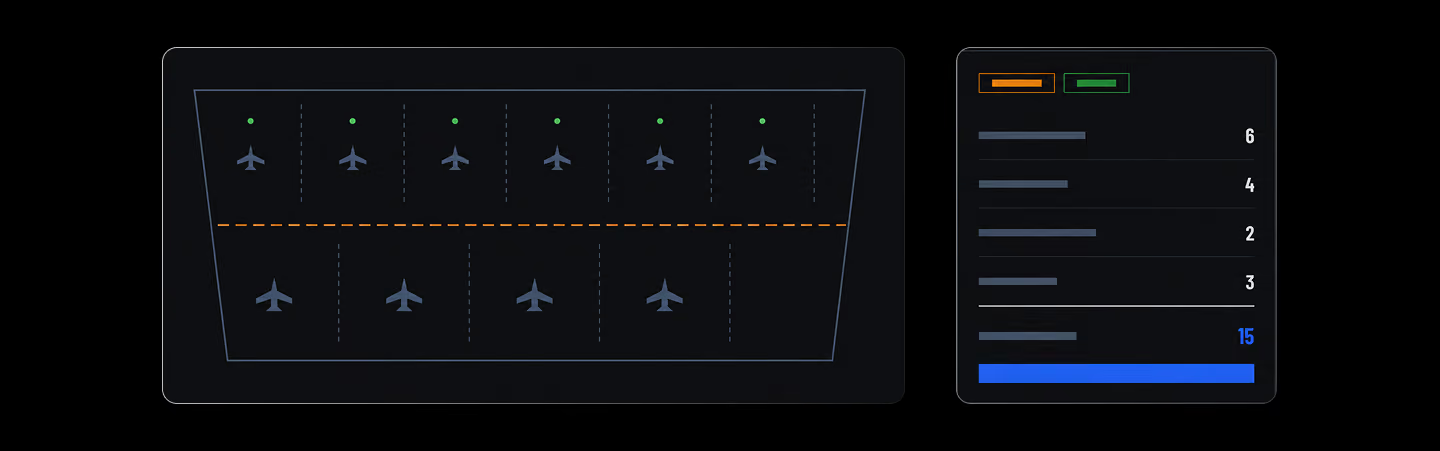
Apron Planner

Fills a selected apron boundary with aircraft stands and circulation corridors, then commits the layout back to the model.

Terrain Grading Editor

Promote detected contours, author exact feature lines, grades, and pads, then refine with terrain-scaled brushes.

Decision guide

How to choose

Filter the list through the two things ArchiCAD users actually care about, Mac support and a design-first workflow:

  • By platform: On a Mac studio, your realistic options are Snaptrude (browser), Vectorworks Architect (Mac-native), BricsCAD BIM, and FreeCAD. Revit and Allplan are Windows-only.
  • By phase: For concept-to-schematic speed, Snaptrude. For full DD/CD replacement, Vectorworks or Revit. For DWG-centric documentation, BricsCAD BIM.
  • By budget: FreeCAD is $0, Snaptrude starts free, BricsCAD BIM (~€1,060/yr) and Vectorworks ($1,530/yr) both undercut ArchiCAD's $2,414–$2,840/yr; Revit costs more at $3,030/yr.
Your files come with you: every tool here reads IFC and DWG, which ArchiCAD exports cleanly. And Snaptrude works in the other direction too. Its ArchiCAD export add-on pushes models into AC 26/27, so trying it doesn't mean leaving.

Keep comparing

Frequently Asked

Questions

How much does ArchiCAD cost in 2026?

ArchiCAD costs $2,414/year for Archicad Studio or $2,840/year for Archicad Collaborate (with BIMcloud teamwork and MEP Designer), paid upfront per seat, before tax. Month-to-month runs $345–$406/month. Graphisoft no longer sells perpetual licenses. Subscription is the only way to buy ArchiCAD in 2026.

Is ArchiCAD cheaper than Revit?

Yes. Archicad Studio at $2,414/year is about $600 less than Revit's $3,030/year standalone subscription; even Archicad Collaborate at $2,840/year undercuts it. ArchiCAD also runs natively on macOS, while Revit is Windows-only, so for Mac firms the real comparison is ArchiCAD vs Vectorworks or Snaptrude.

What is the best ArchiCAD alternative for Mac?

Snaptrude and Vectorworks Architect. Snaptrude runs in the browser on any Mac with no install, covers concept-to-schematic BIM, and exports to ArchiCAD 26/27. Vectorworks Architect ($1,530/yr) is the closest Mac-native full replacement: also design-first, also under the Nemetschek umbrella. Revit is not available on macOS.

Is there a free ArchiCAD alternative?

Two genuine ones. Snaptrude's free plan includes 3 projects with real BIM modeling and Revit export, free indefinitely, not a trial. FreeCAD is fully free and open source with an integrated BIM workbench and native IFC support, though its interface is rougher and large models get slow.

Can I move ArchiCAD projects to another BIM tool?

Yes, via IFC. ArchiCAD's IFC export is among the best in the industry, and every tool on this list imports it. Expect geometry and classification data to carry over cleanly, while tool-specific parametrics need rebuilding. DWG covers 2D deliverables. Snaptrude additionally exports back into ArchiCAD 26/27 via its add-on.

More Alternatives

Design better

buildings together

Try Snaptrude