Last updated:
BIM Change Impact Assessment: Check the Cascade Before Approval
TL;DR
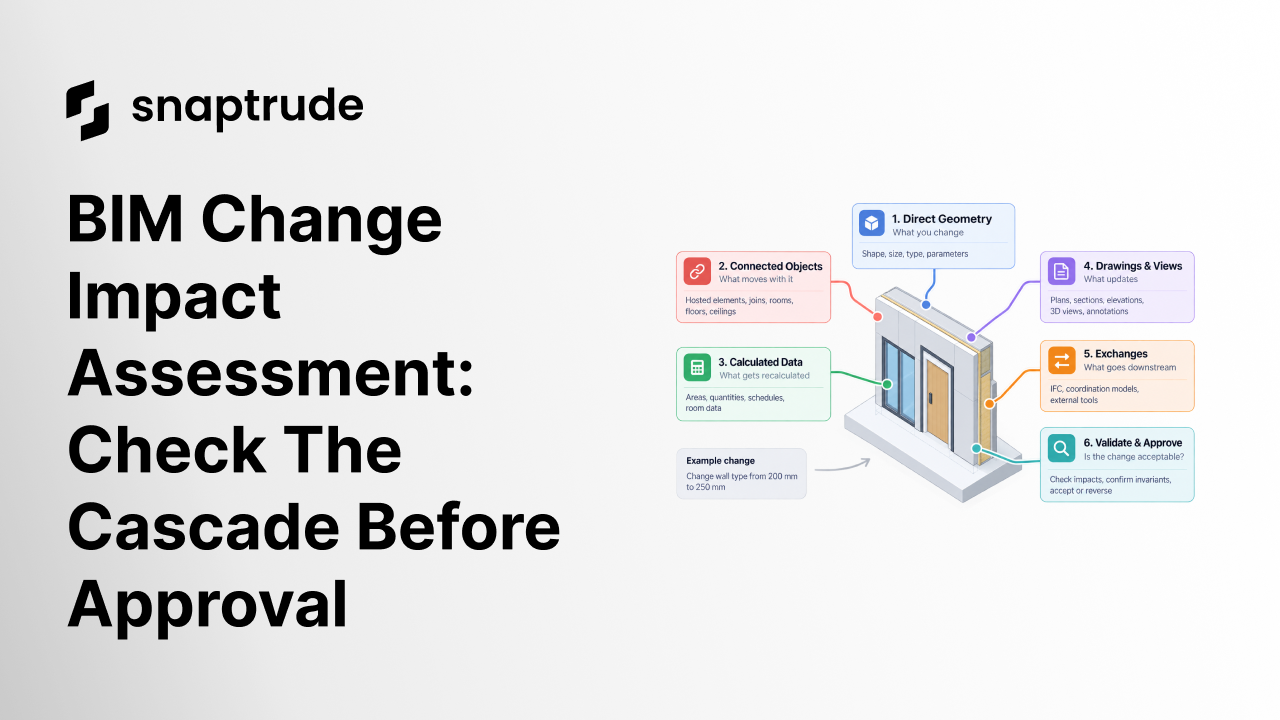
A BIM change impact assessment identifies what a proposed edit can alter, which results must remain true, and how the team will validate or reverse the change. Map direct geometry, dependent objects, calculated data, drawings, views, and exchanges before approval so a locally correct edit does not create a project-wide error.
What is a BIM change impact assessment?
A BIM change impact assessment is a short, evidence-based review performed before and after a meaningful model edit. It defines the proposed change, maps dependencies, records expected outcomes, identifies unacceptable effects, and names the person who can accept the result.
The method is necessary because BIM changes rarely stop at the selected object. Changing a wall type can affect thickness, adjacent room area, junctions, openings, hosted casework, floor and ceiling edges, material quantities, annotations, schedules, views, and exported objects. Moving a level can change every element constrained to it. Reclassifying a space can change colors, area reports, sheets, and downstream data.
Start by classifying the edit:
Then define the invariant, the condition that must remain true. If an exterior wall thickens, perhaps the building grid must remain fixed and room area may change. In another project, the internal finished face must remain fixed to protect room clearances. A parametric system cannot choose the right invariant unless the project defines it.
Use a dependency map with six rings: selected object, connected geometry, hosted and related objects, calculated data, documentation, and external consumers. A change does not need a detailed impact in every ring. It needs an explicit “affected,” “not affected,” or “unknown, test required” decision.
.jpeg)
How do you run a BIM change impact assessment?
Run the assessment in four stages: prepare, execute, validate, and close.
Prepare. Record the model and revision, selected scope, reason, author, expected outcome, invariants, known dependencies, and acceptance owner. Save an appropriate recovery point. Use a representative sandbox first when the edit changes types, levels, coordinates, or many objects.
Execute. Make the smallest coherent change. Do not combine an alignment change, type replacement, reclassification, and view cleanup in one untraceable action. If automation performs the edit, keep its input, scope, exceptions, and result summary.
Validate. Inspect the changed object first, then walk outward through the dependency rings. Use automated checks for counts, missing values, overlaps, and schedule differences, but include visual checks in plans, sections, elevations, and three-dimensional views. Open the downstream schedule or exchange that actually matters.
Close. Mark the change accepted, accepted with exceptions, rejected, or reversed. Record unresolved effects with an owner and due date. Update the issue or decision record, not only the model. A technically successful command is not a completed change until its consequences have been reviewed.
Use Snaptrude to inspect model, program, quantity, and presentation effects in one project context.
Which BIM change impact assessment checks belong in the matrix?
Prioritize by consequence, not object count. A single shifted control point can be more serious than a thousand expected quantity updates. Define thresholds for automatic approval, assigned exception, and stop-work review. Unknown effects should trigger investigation rather than optimistic acceptance.
Model stage changes the expected cascade. BIMForum's 2025 LOD Specification treats information derived from LOD 200 elements as approximate, while LOD 300 geometry is accurate and measurable. The same edit therefore needs different checks at different stages. Link acceptance criteria to the information used for the decision, not a blanket LOD label.
How to Evaluate BIM Software explains why representative project work is a better test than a feature demo. This assessment adds a narrower question: even when the model remains valid, did the edit alter something the project needed to preserve? The account of how the Revit and Snaptrude link was built helps extend that thinking into a receiving application.
How does Snaptrude support a BIM change impact assessment?
Verified product facts state that Snaptrude connects Program, Design, BIM, and Present modes in one workflow. It supports parametric modeling, real-time area and quantity feedback, derived plans, sections and elevations, schedules, live presentation updates, and several export paths.
That connected environment lets reviewers inspect several effects without recreating the project in separate files. It does not eliminate the need to define invariants, severity, scope, and approval. Product facts do not promise that every custom dependency or external application will be validated automatically. For critical changes, save evidence, test the receiving task, and keep a recoverable revision.
FAQ: Frequently Asked Questions
Q: Which edits require a BIM change impact assessment?
A: Use one for changes that affect repeated objects, levels, coordinates, types, rooms, design options, quantities, documentation, or exchanges. A small local edit may use a lightweight checklist. A type replacement across a building, level movement, coordinate change, or automation run needs broader review. Scale the assessment to consequence and uncertainty, not simply the number of selected objects.
Q: What is the difference between validation and impact assessment?
A: Validation asks whether the resulting model meets defined rules. Impact assessment asks what the change may affect, which effects are expected, and which conditions must remain true. A model can pass geometric validation while still changing a room area, schedule, view, or export unexpectedly. Strong change control uses both: impact mapping before execution and validation after it.
Q: How do teams identify BIM dependencies?
A: Start with the selected object's hosts, constraints, joins, containment, classifications, and calculated properties. Then inspect related rooms, floors, ceilings, openings, annotations, schedules, views, options, phases, and external consumers. Mark each relationship affected, unaffected, or unknown. Reuse dependency patterns by object type so the team improves the map with every reviewed change.
Q: Should every unexpected change be reversed?
A: Not necessarily. Some unexpected changes are legitimate consequences that the project can accept after review. Classify the effect, measure its severity, identify who owns the decision, and document acceptance. Reverse when the effect violates an invariant, exceeds tolerance, creates an unowned risk, or cannot be understood. Do not leave a surprising result in the model simply because the command completed.
Q: Can Snaptrude show the effects of a model change?
A: Verified facts support connected model geometry, program data, areas, quantities, derived drawings, schedules, and live presentation updates. Those views can help a reviewer inspect change consequences. Product facts do not establish universal automated impact detection for every custom relationship or receiving tool, so teams should still define expected effects and perform targeted checks.
Q: How should an automated BIM edit be approved?
A: Record the automation's inputs, scope, authority, expected result, invariants, exceptions, and model revision. Test a representative subset when possible. After execution, compare objects, dependent geometry, quantities, drawings, and downstream use. A named reviewer should accept, assign exceptions, reject, or reverse the change. Automation changes who performs the action, not who owns the architectural decision.
Map the cascade before the edit, then close the change with evidence.



