Last updated:
BIM Software Pricing Compared (2026): Per-Seat, Floating, Per-Project and No-Contract Plans
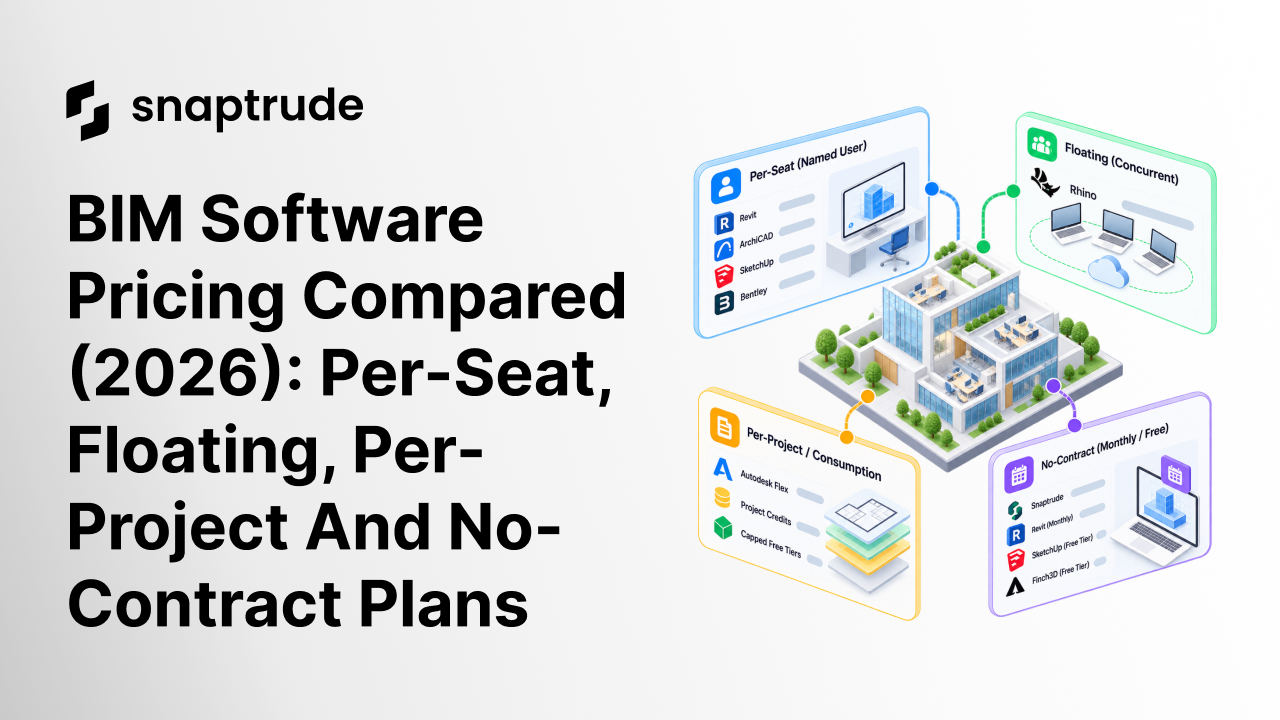
Two quotes for the same twelve-person firm can differ by thousands of dollars. Neither quote usually explains why.
The gap rarely comes from the software itself. It comes from the license model: who may use a seat, on how many machines, and for how long. A list price means little without that context.
This guide compares BIM pricing across four models: per-seat, floating, per-project and no-contract. All figures come from vendor pages checked in October 2026, and we flag the ones we could not verify. Where a vendor hides its price behind a sales call, we say so.
The short version
Per-seat pricing dominates the market. Revit runs about $3,012 a year, Bentley starts at $3,844 and SketchUp Pro costs about $399. Floating licenses are rare, and Rhino is the clearest published example.
True per-project price lists are rarer still. The closest options are consumption plans such as Autodesk Flex and capped free tiers. No-contract choices are growing, led by monthly plans and free entry tiers.
Pricing models at a glance
Four models cover almost every plan you will meet. Each one shifts cost and risk to a different party.
- Per-seat (named user): One license, one person. Revit, ArchiCAD, SketchUp, Edificius, Bentley and Allplan sell this way.
- Floating (concurrent): You pay for peak simultaneous use, not headcount. Rhino prices licenses per concurrent user.
- Per-project or consumption: You pay by project cap, credit or day of use. Autodesk Flex and capped free tiers come closest.
- No-contract: Monthly or free plans you can leave without penalty. Revit month-to-month, Snaptrude Individual and Finch3D Basic qualify.
Why the pricing model matters more than the price
Small firms feel license costs first. PlanRadar's BIM adoption overview cites a 2020 AIA survey in which over a third of small firms use BIM. It adds that license and hardware costs can be prohibitive for smaller firms.
AIA's Firm Survey Report tracks the share of firms using BIM on billable projects. Adoption is high at large firms, so the pricing question shifts from whether to buy to how to buy. The answer depends on headcount, project rhythm and how many people touch the model.
A ten-person firm with ten daily users needs per-seat licenses. A forty-person firm where eight people model at once may not. Matching the model to your usage pattern often saves more than negotiating a discount.
1. Per-seat pricing: Pay for each person
Per-seat pricing is the default. Each license belongs to one named user, who may install it on several machines but run one at a time. The model is simple to budget and costly for occasional contributors.
The table below lists current list prices. Treat them as starting points, because discounts, regions and currencies vary.
A few details change the math. Autodesk says buying the AEC Collection's included products separately would cost $5,430 to $7,935 a year, depending on discipline. It also lets you lock a price for three years.
Autodesk allows one subscription on up to three computers, but only the named user can sign in. ArchiCAD ended perpetual licensing in 2025, so it is now subscription-only. Trimble Connect, a collaboration product, adds $349 or $499 per user per year, depending on the tier.
One caution on SketchUp. Older comparison pages show lower figures than the live page does. We used the live monthly prices above, so recheck before publishing a budget.
Occasional contributors are where per-seat pricing hurts. A structural engineer who opens the model for three weeks still holds a full seat for twelve months. Multiply that by every consultant, and the unused capacity adds up.
Concept tools add a second kind of waste. Firms that model in SketchUp and rebuild in Revit pay for two licenses and two modeling passes. That workflow is the real incumbent any new platform must displace.
Subscription fatigue is real as well. Revit, AutoCAD, ArchiCAD and Snaptrude are subscription-only, while Rhino still sells a perpetual license. A perpetual license moves cost to the front but removes renewal risk.
2. Floating and concurrent licenses: Pay for peak use
Floating licenses charge for how many people work at once, not how many people exist. A firm with thirty staff and eight daily modelers buys eight concurrent seats. Everyone else borrows a seat when one is free.
Rhino publishes the clearest example. Its commercial price list for North America is below.
Notice that the price scales in a straight line. Ten concurrent users cost exactly ten times one. The saving comes from buying fewer seats than you have staff, not from a bulk discount.
Here is an illustration. A twenty-person studio never has more than eight people in Rhino at once. Eight concurrent licenses cost $7,960, while twenty single licenses would cost $19,900.
Floating licenses carry trade-offs of their own. If nine people need the tool at once and you own eight seats, someone waits. Deadlines cluster, so peak demand often exceeds the average.
Administration also takes effort. Someone must monitor usage, set borrowing rules and resize the pool each year. License managers reduce that burden but do not remove it.
Rhino's page says purchased licenses are permanent and carry no maintenance fees. It also offers the Zoo and the free Cloud Zoo to manage shared licenses. Rhino is a modeling tool rather than a full BIM platform, so read it as a pricing model example.
Autodesk takes the opposite approach for Revit. Its page ties each subscription to one named user, so it is not a floating arrangement. Flex is the closest alternative, and we cover it below.
Snaptrude's Organization plan includes a license and team management portal and three license transfers a year. The Enterprise plan adds unlimited licenses. For concurrent-use terms, talk to the team, and read Snaptrude's guide to floating licenses first.
3. Per-project and consumption pricing: Pay for what you use
In the vendor pages we checked, no BIM authoring tool published a true per-project price list. The nearest models are consumption plans, credit systems and project caps. Each one ties cost to activity rather than headcount.
Autodesk Flex lets you buy tokens and pay at a daily rate for more than 100 products. Autodesk's AEC Collection page also links to prepay pricing for occasional use. Both suit a consultant who needs Revit for three weeks a year.
Project caps appear on free tiers. Snaptrude's Free plan allows three projects, while Individual removes the cap. Speckle's Explore plan allows one project and up to three users, and its paid Custom Plans lift both limits.
Daily rates suit short bursts. Steady users should model both options before committing, because annual terms usually discount the rate.
Credit systems are common among AI-native tools. Maket.ai's Homeowner plan costs $20 a month for 300 credits, and Pro costs $100 for 3,000. A floor plan costs 20 credits and a render costs 10.
Veras, from Chaos, sells credits too, starting at about $202.80 a year for 500. Chaos calls its credit system an introductory offer.
AI features add a new meter. Budget credits separately from licenses, and ask whether they roll over, expire or pool across the team.
Some vendors avoid published prices entirely. Higharc, a homebuilding platform, is demo-led, and AEC Magazine reports it avoids per-seat and metered charges. Swapp quotes custom credit-based pricing by firm size and project mix.
4. No-contract plans: Pay monthly, leave freely
No-contract plans reduce risk for small teams and pilots. You can start, test and stop without a multi-year commitment. They cost more per month than annual terms, so use them deliberately.
- Revit month-to-month: Autodesk lists no long-term commitment, with the option to switch to a one-year or three-year term later.
- Snaptrude Individual: $60 per month for one user, with unlimited projects and basic BIM and Revit export.
- Finch3D Basic: €79 per month with a 14-day trial, for one user.
- Edificius: €119 for a single month, though the vendor says subscriptions are non-refundable.
- Chief Architect Premier: $229 per month, as an alternative to the $1,995 annual price.
- Free tiers: Snaptrude Free, Speckle Explore and the open-source Bonsai cost nothing to try.
- Trials: BricsCAD BIM, Edificius and Trimble Connect each offer 30 days.
Flexibility has a price. Edificius charges €119 for a single month but €67 per month on a one-year plan, a 78 percent premium. Chief Architect's $229 monthly rate totals $2,748 over a year, against $1,995 on the annual price.
Autodesk says annual Revit terms save 33 percent over the monthly price. Use monthly plans for pilots and seasonal peaks. Move steady users to annual terms.
Read the cancellation terms, not just the headline. A monthly plan that auto-renews at a higher rate is not truly flexible.
5. Snaptrude: Free to start, annual on Organization
Quick note: We are the team behind Snaptrude, so we have an interest in how this section reads. The plan details below come from the Snaptrude pricing page.
Snaptrude is the design OS for the AEC industry, built on a real geometric model with AI on top. Teams can enter at any stage and exit at any stage, from a blank site to constructability documents. Humans keep the judgment and the authorship while the AI does the work.
The Free plan costs $0 and includes three projects, basic BIM and Revit export, and a single user. Presentation outputs are limited, and there is no teams environment. Individual costs $60 per month and adds unlimited projects and unlimited presentation outputs.
Organization costs $100 per month billed annually and is marked most popular. It adds teams and collaboration, a license and team management portal, and three license transfers a year. It also adds custom roles and permissions, plus a BIM library and custom RFAs.
Enterprise is custom-priced and billed annually. It adds unlimited licenses, SSO, SAML and MFA, open API access, premium support and directory sync. The pricing page offers no time-limited trial, so the Free plan is the entry point.
Read the details on Snaptrude's pricing page before you plan a budget, because plans change. Note one honest limit as well: Snaptrude has no energy, carbon, CFD wind, noise or microclimate analysis. Firms that need those studies will pair it with another tool.
The hidden costs behind the list price
List price is only part of the bill. Several costs sit outside the quote, and they can matter as much as the seat price.
- Rendering add-ons: SketchUp Pro users often add V-Ray or Enscape at roughly $500 or more per year each. Studio includes V-Ray and Scan Essentials.
- Hardware: Revit reviewers cite heavy hardware needs. Bentley's OpenBuildings Designer is Windows-only with a 16GB RAM minimum.
- Training: G2 reviewers, across 937 Revit reviews, cite a six to twelve month learning curve. Unbilled ramp-up time is a real cost.
- Version lock-in: A Revit 2024 file will not open in Revit 2023. Teams upgrade together, so renewals and training happen on the vendor's schedule.
- Support: Autodesk includes 8x5 support with subscriptions and Flex. Snaptrude's Enterprise plan adds premium support. Ask which support hours your tier includes.
- Renewal terms: Autodesk offers a three-year price lock. Other vendors reprice annually, and some subscriptions are non-refundable.
Account for these before you compare quotes. A cheaper seat that needs a longer ramp and more hardware may not be cheaper overall.
Ten-seat cost comparison
Simple multiplication shows how models scale. The table below multiplies list prices for ten seats on annual terms. It ignores discounts, and the products differ in scope, so it is not a like-for-like ranking.
The SketchUp row is a concept tool, not BIM, so it sets a floor rather than a peer. Euro rows use each vendor's own currency. Per-seat annual prices for SketchUp and Snaptrude come from monthly rates multiplied by twelve.
Ten seats is only a starting point. Costs shift as headcount grows or shrinks. Recalculate with your own peak concurrency, contractor count and renewal dates.
Which pricing model fits your firm?
Solo architects and small studios usually do best with a free tier or a monthly plan. Test with Snaptrude Free, Speckle Explore or a vendor trial, then commit annually once the tool earns its place.
Mid-size firms of ten to fifty people usually land on per-seat annual terms. Negotiate for multi-year price locks and ask about volume pricing. Use how to evaluate BIM software as a checklist before you sign.
Large firms should ask about enterprise agreements, concurrent licensing and SSO. Ask what each tier includes, because identity features often sit on the top plan. Request written confirmation of license transfer rules for staff turnover.
Also agree how the vendor counts a user. A contractor who works two months on a project may still need a seat.
Questions to ask before you sign
A good quote answers seven questions. Ask them in writing, and keep the replies with the contract.
- Transfers: Can you move a license when someone leaves, and how often?
- True-ups: What happens if usage exceeds your purchase mid-term?
- Price locks: Is the price fixed for the full term, and what is the renewal uplift?
- Add-ons: Which rendering, storage or AI features cost extra?
- Cancellation: Can you cancel mid-term, and is any of the fee refundable?
- Identity: Does SSO sit on your tier or only on enterprise plans?
- Data exit: Can you export models in open formats if you leave?
Procurement teams that ask these early avoid surprises at renewal. The answers also reveal which vendors treat licensing as a partnership.
Frequently asked questions
How much does BIM software cost per year?
It ranges from free to roughly $4,700 per seat. Open-source Bonsai and free tiers cost nothing. Revit costs about $3,012, Bentley starts at $3,844 and Allplan's US Ultimate edition costs $4,704.
Are floating licenses cheaper than per-seat licenses?
They can be, when peak simultaneous use is well below headcount. Rhino's concurrent pricing scales linearly, so the saving comes from buying fewer seats. If everyone models daily, per-seat pricing costs the same or less.
Is there a perpetual BIM license?
Rhino is the main perpetual option in this set, at $995 with no maintenance fees. It is a modeling tool rather than a full BIM platform. ArchiCAD ended perpetual licensing in 2025, and Revit and Snaptrude are subscription-only.
Does SSO cost extra?
It depends on the vendor. Autodesk includes SSO with Revit subscriptions. Snaptrude places SSO, SAML and MFA on Enterprise, and Finch3D and Speckle place it on top tiers.
What is the cheapest way to try a BIM tool?
Start with free tiers and trials. Snaptrude Free offers three projects, Speckle Explore offers one, and BricsCAD BIM, Edificius and Trimble Connect offer 30 days. Finch3D Basic offers 14 days.
What belongs in an enterprise BIM agreement?
At minimum, ask for license transfer rules, price locks, SSO and support terms in writing. Add data export rights and cancellation terms. Snaptrude's Enterprise plan includes unlimited licenses, SSO, SAML, MFA, directory sync and open API access.
Do AI features cost extra?
Often. Maket.ai and Veras bill by credit, and Swapp quotes credit-based pricing. Snaptrude's pricing page mentions extended AI generations on paid plans but lists no quantities.
Can we mix pricing models?
Yes. Many firms hold per-seat licenses for daily modelers and add consumption or monthly plans for peaks and pilots. Just document who owns each license.
Should we choose by price alone?
No. Price is one input beside file compatibility, training, hardware and support. A tool that fits your delivery workflow beats a cheaper one that forces rework.
Pick the model before you pick the vendor
Start with how your people actually work. Daily modelers need per-seat licenses, occasional contributors suit floating or consumption plans, and pilots suit no-contract plans. The vendor shortlist follows from that.
Then compare total cost: seat price, add-ons, hardware, training and renewal terms. Ask every vendor for written terms on transfers, trials and cancellation. Recheck every number here before you budget, because list prices move.
Want to see how Snaptrude fits your firm's licensing needs? Book a demo and the team will map plans to your workflow. Bring your headcount and your current quotes. Let us show you the options.


