Last updated:
BIM Round Trip Workflow: Prevent Duplicate or Missing Model Data
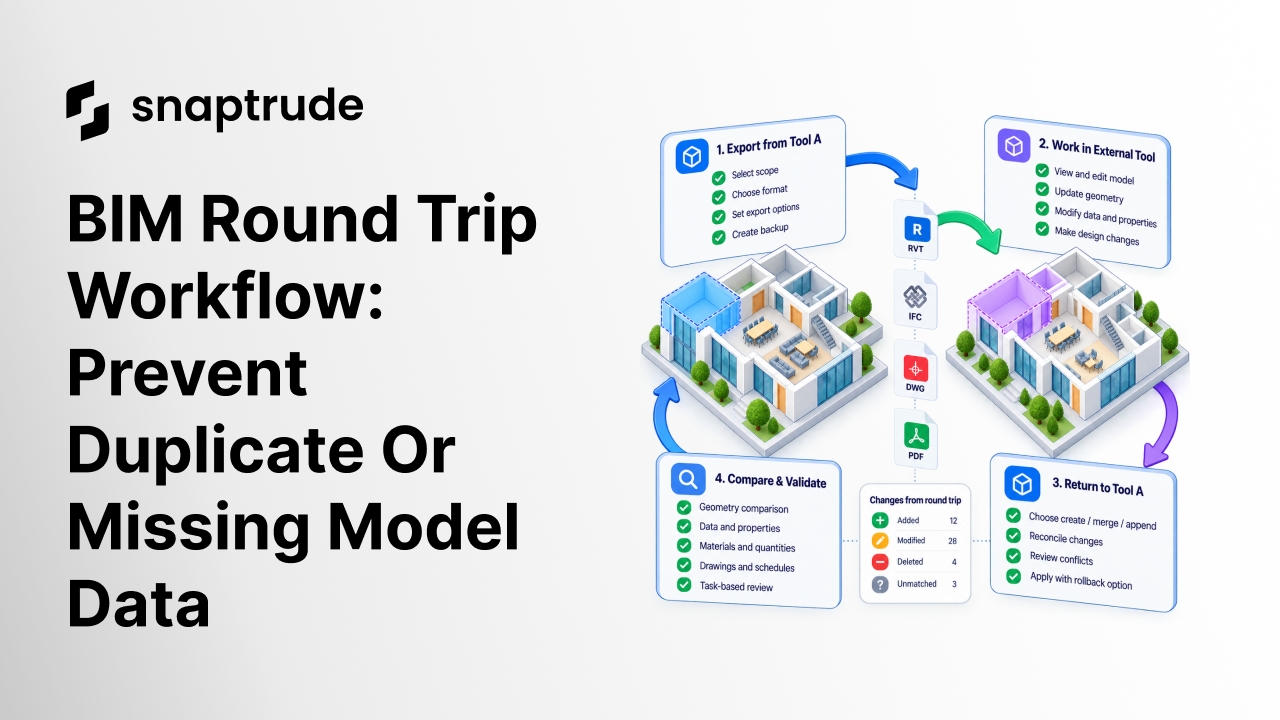
TL;DR
A BIM round trip workflow is not complete when the returned file opens. Define whether the transfer creates a new model, merges changes into an existing one, or appends content. Preserve stable identity, reconcile additions, edits, and deletions, then compare geometry, data, materials, quantities, and drawings. Test with a representative model, maintain a rollback point, and make every conflict visible before acceptance.
What is a BIM round trip workflow?
A BIM round trip workflow is the controlled movement of a model from a source environment to another tool and back, with a defined method for reconciling what changed. It covers more than import and export. It includes scope, identifiers, mappings, ownership, conflict rules, validation, exception handling, and rollback.
The first question is not file format. It is intent: are you creating a new destination model, updating an existing model, or appending a separate package? Those operations carry different risks. A new model may omit destination-only work. A merge may overwrite accepted changes. An append may duplicate objects that already exist.
Write the expected behavior before the first transfer. State which environment is authoritative for each element or property, what can change during the round trip, what must remain untouched, and who resolves conflicts. If the team cannot describe the rules, the software cannot infer the project agreement safely.
Review the documented Snaptrude-to-Revit export path before approving an exchange.
How should a BIM round trip workflow handle model state?
Choose one of three explicit modes and show it to the operator before the transfer begins.
Do not let a file name determine the mode implicitly. The user should confirm the target, expected action, and backup. If the target already contains content, present the proposed additions, modifications, deletions, and unresolved matches before committing the change.
Keep a rollback point that is independent of the exchanged file. Version the source model, destination model, mapping configuration, application versions, and export settings. Record the operator and time so a failed exchange can be reproduced without guessing which state was used.
Which BIM data must survive a round trip?
Build a requirement matrix for the project instead of asking whether the model came through “correctly.” Typical categories include:
Mark each field as required, optional, intentionally transformed, or unsupported. An intentional transformation can pass when it is documented and reversible enough for the job. An invisible loss cannot.
Check semantics separately from appearance. A wall that looks right may return as disconnected geometry. A room may retain its boundary but lose its department. A material may keep its color but lose the classification used in quantities. Visual parity is necessary for many workflows, but it is not proof of data parity.
How do you reconcile additions, edits, and deletions?
Use persistent identifiers where the applications and format support them. When identity cannot be preserved, document the matching logic and expose uncertain matches. Geometry proximity alone can confuse repeated rooms, stacked floors, copied units, and elements that moved intentionally.
Classify every returned object into a change set:
Deletions deserve special care. Absence may mean intentional deletion, export filtering, unsupported data, or a failed transfer. Do not remove destination objects solely because they are missing from the returned file unless the workflow proves that deletion was intended.
For conflicts, apply the project ownership matrix. Geometry may be authoritative in one environment while specification data belongs to another. A single “latest wins” rule can destroy good work when different disciplines own different fields.
How do you validate the returned model?
Begin with automated comparisons, then perform task-based review. Compare object counts by type, unmatched identifiers, bounding extents, levels, room areas, material assignments, property completeness, and key schedule totals. Flag differences; do not hide them inside an overall percentage.
Then open the returned model and perform representative tasks. Edit a wall, move an opening, update a room, inspect a schedule, generate a drawing, save, reopen, and export again. A technically complete transfer can still fail if ordinary project work becomes unstable or the model loses editability.
Use a fixed acceptance table:
See how a bidirectional Revit and Snaptrude link supports model collaboration.
What should happen when the round trip fails?
Stop the merge, preserve the evidence, and classify the failure. Determine whether it came from unsupported scope, an incorrect mapping, identity loss, a version mismatch, corrupted source data, resource pressure, or ambiguous user intent. Reduce the case to the smallest representative package without removing the condition that caused it.
Do not repair the destination manually and call the workflow validated. Manual repair may be appropriate for project delivery, but log it as an exception and rerun the controlled case after the underlying issue changes. Otherwise the next round trip can recreate the same loss.
Maintain separate acceptance criteria for geometry, data, performance, and user experience. A slow exchange, a confusing conflict screen, and missing metadata are different defects with different owners.
How can Snaptrude support a BIM round trip workflow?
Snaptrude supports BIM objects and data, parametric concept modeling, drawings, quantities, schedules, collaboration, and documented Revit, Rhino, Grasshopper, DWG, IFC, and PDF exchange capabilities. This provides several paths for moving design information between concept and downstream work.
The supported scope and behavior can vary by format, object, and product version. Confirm current capabilities for your chosen path, define create, merge, or append intent, and validate a representative project before relying on the workflow for delivery.
Read how Snaptrude approaches bidirectional Revit import and export.
FAQ: Frequently Asked Questions
What is a BIM round trip?
A BIM round trip moves model information from one application to another and then back to the original or an authoritative environment. A controlled round trip preserves required geometry, data, relationships, and editability while reconciling additions, modifications, and deletions. Opening the returned file is only the first test, not proof of success.
What is the difference between merge and append?
Merge reconciles returned content with an existing model, which may update, create, or delete elements according to defined rules. Append adds a bounded package while leaving existing content intact. Merge needs identity and conflict handling. Append needs strong scope and duplicate detection. The operator should choose explicitly before transfer today.
Does IFC guarantee a lossless BIM round trip?
No. IFC provides an open, standardized data schema, but applications support different entities, property sets, geometry, and workflows. Project-specific mappings and authoring behavior still matter. Define required information, use an appropriate IFC release and view, and compare the returned model. Treat unsupported or intentionally transformed data as documented exceptions today.
How should BIM teams handle deleted elements?
Treat absence as ambiguous until the workflow proves intent. An object may be missing because it was deleted, filtered out, unsupported, or lost during transfer. Require a deletion record or confident identity comparison before removing destination content. Present proposed deletions separately and maintain a rollback point before applying them today.
What should a BIM round-trip test model include?
Use a representative but manageable model with levels, rooms, hosted openings, repeated types, materials, classifications, custom data, schedules, and geometry known to stress the chosen exchange. Include destination-only content and deliberate edits on both sides to test conflicts. Remove private client information before turning it into a reusable benchmark for teams.
When is a BIM round trip ready for production use?
It is ready when the documented create, merge, or append behavior passes repeated tests on representative scope; required geometry and data survive; conflicts are visible; normal editing works; performance is acceptable; and rollback is proven. Continue monitoring real projects because formats, applications, mappings, and model complexity change over time in practice.
Try Snaptrude with a representative exchange model and validate the complete return path.



