Last updated:
BIM Object Data Model: Seven Layers Every Element Needs
TL;DR
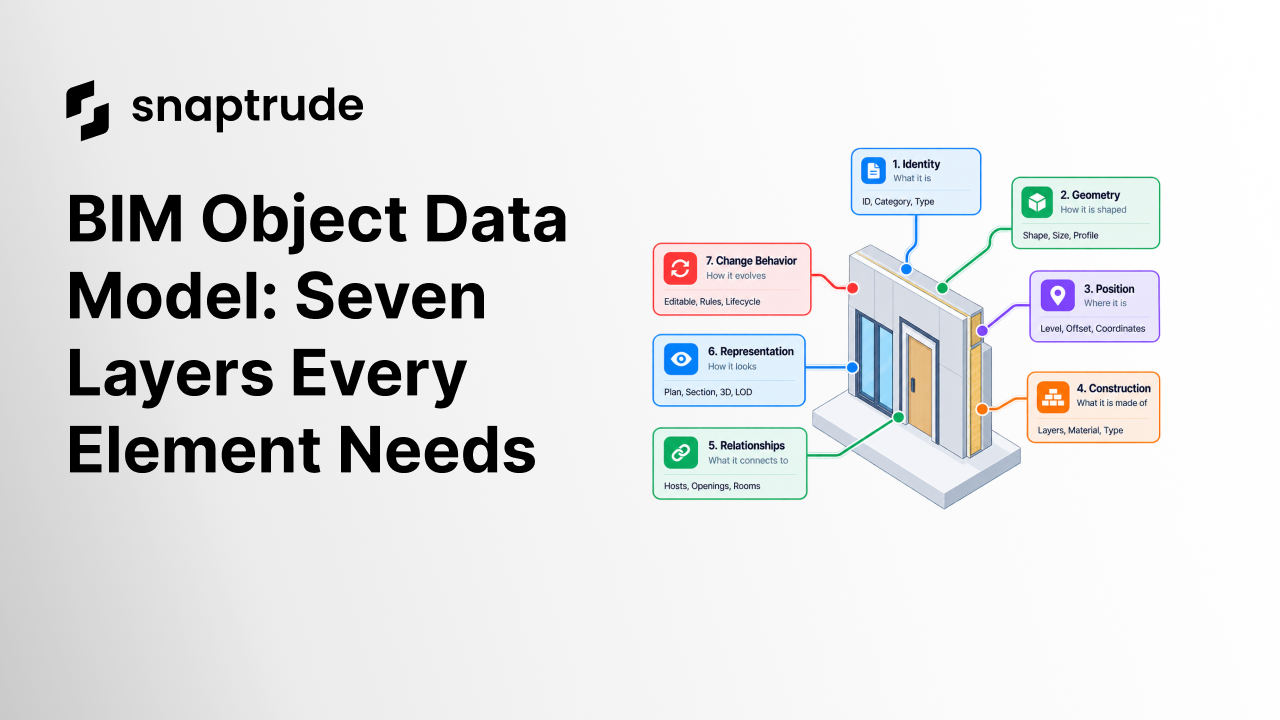
A BIM object data model should describe seven connected layers: identity, geometry, position, construction, relationships, representation, and change behavior. Shape alone is not enough. A reliable element must remain findable, measurable, editable, coordinated, visible, and predictable as the project develops and moves between systems.
What is a BIM object data model?
A BIM object data model is the structured definition of an element's information and behavior. For a wall, door, room, column, slab, or piece of equipment, it explains what the object is, how it is shaped and located, what it is made from, how it relates to other objects, how it appears, and what should happen when it changes.
Think of the model as seven layers:
These layers overlap but should not collapse into one unstructured property list. A material is not only a color. A level is not only a label. A door hosted in a wall is not simply located near it. The structure matters because each relationship supports a different operation, check, or handoff.
The National BIM Standard, United States frames BIM around organizing and classifying electronic object data so owners, designers, suppliers, constructors, and operators can communicate. The object data model is what makes that broader information exchange operational at the element level.
How should a BIM object data model separate geometry and information?
Store the minimal source geometry needed to reproduce and edit the object, then derive display geometry where practical. A wall may begin with a reference curve, height, profile, alignment, and type. Its visible faces, intersections, cut patterns, and quantities can be derived from those inputs. If the system stores only the final mesh or solid, future edits and relationships become harder to interpret.
Separate user intent from calculated results. A wall's type and reference alignment are authored intent. Net area, material volume, room boundary, and graphic cut are derived results. Both matter, but they require different validation. A calculated value should name its inputs and update rule. An authored value should retain provenance and ownership.
Keep position explicit. Coordinates alone do not explain whether a wall is attached to a level, offset from it, constrained under a roof, or aligned by core face. These rules determine how the object responds when the surrounding model changes.
Represent uncertainty too. At concept stage, a wall may be generic, approximately placed, and free of detailed layers. That is valid if the object states its maturity. BIMForum's 2025 LOD Specification distinguishes approximate LOD 200 information from measurable LOD 300 geometry. Do not fill a detailed schema with invented values just to make it look complete.
Use Snaptrude to develop building objects from early design information into BIM.
Which BIM object data model structure works best?
Use object-specific extensions rather than forcing every category into the same fields. A framed wall may need stud spacing and infill; a curtain wall may need grids, panels, and mullions; a structural wall may need reinforcement information. Shared layers give consistency, while typed extensions preserve domain meaning.
Document cardinality and direction for relationships. A door has one current host wall, while a wall can host many doors. A room may be bounded by many walls, and a wall may bound two rooms. This detail determines deletion rules, selection, issue tracking, quantities, and exchange behavior.
Finally, define the lifecycle. Objects are created, typed, copied, split, joined, moved, changed, grouped, exchanged, superseded, and deleted. A dependable schema explains which identity survives each operation and which dependent results must be recalculated. The guide to syncing custom program sheets with BIM shows why identity and relationship rules also matter outside one object or view.
How does Snaptrude use a BIM object data model?
Verified product facts describe Snaptrude's BIM Mode as supporting walls, floors, roofs, columns, beams, doors, windows, materials, quantities, schedules, and derived drawings. Program Mode connects space information to 3D design, while the platform's foundation includes a lifecycle-spanning data schema and a real-time database.
That combination supports model-connected feedback instead of treating geometry, data, drawings, and presentations as unrelated outputs. Product facts do not publish a complete developer schema or promise universal field equivalence across every export. Teams evaluating a specific integration should inspect the current supported objects, properties, relationships, and exchange behavior directly.
For a broad introduction, What Is BIM explains the process. This object-level model is the more practical next step: define what each element must know and do so the wider BIM workflow can rely on it.
FAQ: Frequently Asked Questions
Q: Is a BIM object just 3D geometry with properties?
A: No. Geometry and properties are necessary, but a dependable BIM object also needs identity, position, construction logic, relationships, representation rules, and change behavior. Those layers let it remain traceable, generate drawings and quantities, respond to related edits, and move through project stages. A shape with a property list can still fail as a coordinated building element.
Q: Which field is most important in a BIM object data model?
A: There is no universal single field. Stable identity is essential for traceability, source geometry for editing, position and relationships for coordination, construction for quantities, and representation for documentation. Priority depends on the receiving task and project stage. Define a minimum set for each use, then reject invented completeness when information is not yet known.
Q: How should generic BIM objects become specific?
A: Preserve the accepted reference geometry and identity where possible, then assign a specific type, construction, and information set. Before conversion, define which face, centerline, level, room area, and hosted elements must remain fixed. After it, validate geometry, relationships, quantities, and drawings. A type change is a model change with downstream effects, not merely a label update.
Q: What is the difference between a BIM type and an instance?
A: A type stores characteristics shared by a class of objects, such as a wall assembly or door specification. An instance is a placed occurrence with its own location, host, dimensions where permitted, identity, and status. Editing a type can affect many instances, so the data model should state which properties are shared and which can vary locally.
Q: Which BIM objects does Snaptrude support?
A: Verified product facts list walls, floors, roofs, columns, beams, doors, and windows in BIM Mode, alongside materials, quantities, schedules, and derived drawings. Exact fields, behaviors, and exchange coverage can evolve. For a critical workflow, test representative objects and confirm current support rather than assuming every category or property behaves identically.
Q: Does Snaptrude expose its complete BIM schema through an API?
A: The verified product-facts file describes a lifecycle-spanning data schema and demonstrated private-beta support for custom agents. It does not document a complete public API contract in this source. Teams should confirm current API access, permissions, object coverage, events, and stability with official documentation before committing an integration to project delivery.
Define the object behavior first, then let the model carry that intent forward.



