Last updated:
Architecture Plugin API Checklist: Test the Workflow, Not the Demo
TL;DR
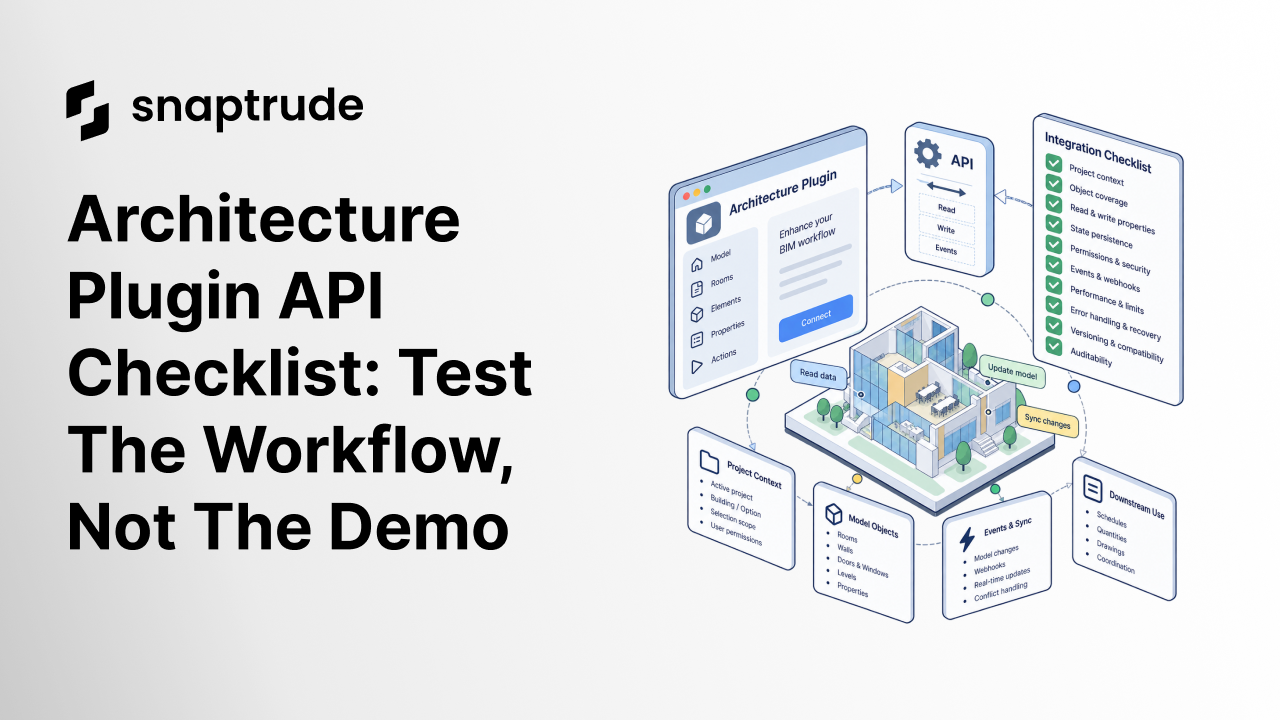
An architecture plugin API checklist should test the complete user task: project context, object coverage, readable and writable properties, state persistence, permissions, events, performance, error recovery, versioning, and auditability. A successful sample request proves connectivity. It does not prove that an integration can survive a real model, shared team, or software update.
What belongs in an architecture plugin API checklist?
An architecture plugin API checklist defines what an integration must read, change, remember, and recover to complete a named architectural task. Start with the workflow. “Connect to the model” is not a requirement. “Read selected rooms, compare actual area with program target, write a reviewed status, and preserve the result for the next session” is testable.
Evaluate ten layers:
The object model deserves particular attention. Many architecture tasks need more than geometry. They depend on stable IDs, type and instance properties, levels, rooms, hosts, layers, classifications, and quantities. The guide to syncing custom program sheets with BIM shows why field meaning and continuity matter across a connected workflow.
Inspect write behavior separately from read behavior. An integration may read wall position but lack the operation or constraint context needed to move the wall safely. It may update a property without triggering the schedule, view, or collaboration event users expect. Define observable postconditions for every write.
.jpeg)
How do you test an architecture plugin API checklist on a real project?
Choose a completed representative project first. It contains known geometry, exceptions, heavy views, repeated types, unusual objects, and established outputs without exposing a live deadline. Create a baseline for the manual task: inputs, steps, duration, decisions, output, error cases, and reviewer.
Build a test pack that includes:
For each case, record expected request, response, model effect, event, user message, and recovery. Include a “no change” assertion. If validation fails or permission is missing, the model should remain untouched. If the operation is retried, idempotency should prevent duplicate objects or repeated writes.
Test selection and context explicitly. A plugin that works when a developer passes a hardcoded project and object ID may fail in practice when a user switches stories, opens another building, changes the active option, or returns a day later. Capture context at execution, display it to the user, and confirm it again before a high-impact write.
Test integrations against an actual Snaptrude project context.
Which architecture plugin API checklist depth fits the integration?
Increase controls with the impact of the write. A report can be wrong without changing the source model, though it can still mislead a decision. A geometry editor can alter rooms, quantities, views, and exchanges. An autonomous workflow needs explicit authority, checkpoints, and a safe stop path.
NIST's AI RMF Core calls for defined context, human oversight, evaluation, third-party risk controls, and procedures to respond and recover. Those are useful requirements even when only part of the integration uses AI. The checklist should name the system boundary and accountable people, not assume the API provider owns the whole workflow.
Introducing Apps and App Builder in Snaptrude shows how firm workflows can become connected applications. An API evaluation focuses on whether the underlying connection can carry the required state and action reliably.
How does Snaptrude fit an architecture plugin API checklist?
Verified product facts establish a cloud-native, browser-based BIM platform with real-time multiplayer collaboration, a lifecycle-spanning data schema, and several export and integration paths. They also document custom agents as demonstrated private-beta capabilities that can use firm knowledge, external model harnesses, web search, and proprietary data sources.
These facts support evaluation of connected workflows, but they are not a complete public API specification. Confirm current authentication, object access, permissions, events, write operations, limits, versioning, and support in official documentation or with the product team. Do not turn a private-beta demonstration into a general-availability claim or service-level commitment.
FAQ: Frequently Asked Questions
Q: What is the first requirement in an architecture plugin API checklist?
A: Define the user task in observable terms. Name the project context, objects, inputs, decisions, writes, output, and acceptance evidence. A requirement such as “access the BIM model” is too broad. A requirement such as “read selected spaces and report target-versus-actual area for the active option without changing the model” can be implemented, tested, and approved.
Q: Why is object position important in a BIM API?
A: Position is more than coordinates. Architectural objects can be aligned to reference curves, hosted by other elements, constrained to levels, offset from stories, and contained within buildings or options. An API should expose enough context to interpret and validate location. A geometry write that ignores constraints may move the visible object while breaking related rooms, openings, or documentation.
Q: What does state persistence mean for a plugin?
A: State persistence means the integration can restore the configuration, project context, selected scope, job status, checkpoints, and reviewed results needed after a refresh, restart, or later session. Store only what is authorized and necessary. Version the state schema, detect stale context, and ask for confirmation before resuming a write against a model that changed meanwhile.
Q: How should an API handle a partial BIM update?
A: Prefer a validated transaction that either commits the intended set or leaves the model unchanged. When that is impossible, return item-level results, preserve idempotency, identify every changed object, and provide a compensating or rollback action. The user should know whether the job succeeded, failed safely, or needs repair. A generic error after silent partial writes is not acceptable.
Q: Does Snaptrude have custom agent capabilities?
A: Verified facts describe custom or bring-your-own agents demonstrated in Snaptrude AI private beta. They can be built around firm knowledge and external data sources. This is demonstration evidence, not a promise of general availability, API coverage, pricing, or performance. Confirm the current product and developer access before designing or announcing a production workflow.
Q: Can a successful API demo replace a pilot?
A: No. A demo shows that a curated path can work. A pilot tests representative objects, permissions, state, model size, concurrency, failures, retries, versioning, and the complete user task. Use a completed project with known outputs, compare the integrated workflow with the manual baseline, and require a reviewer to approve the result before moving to live delivery.
Evaluate the contract behind the integration before you automate the project.



