Last updated:
Architectural Workflow Automation Requirements: Write the Brief
TL;DR
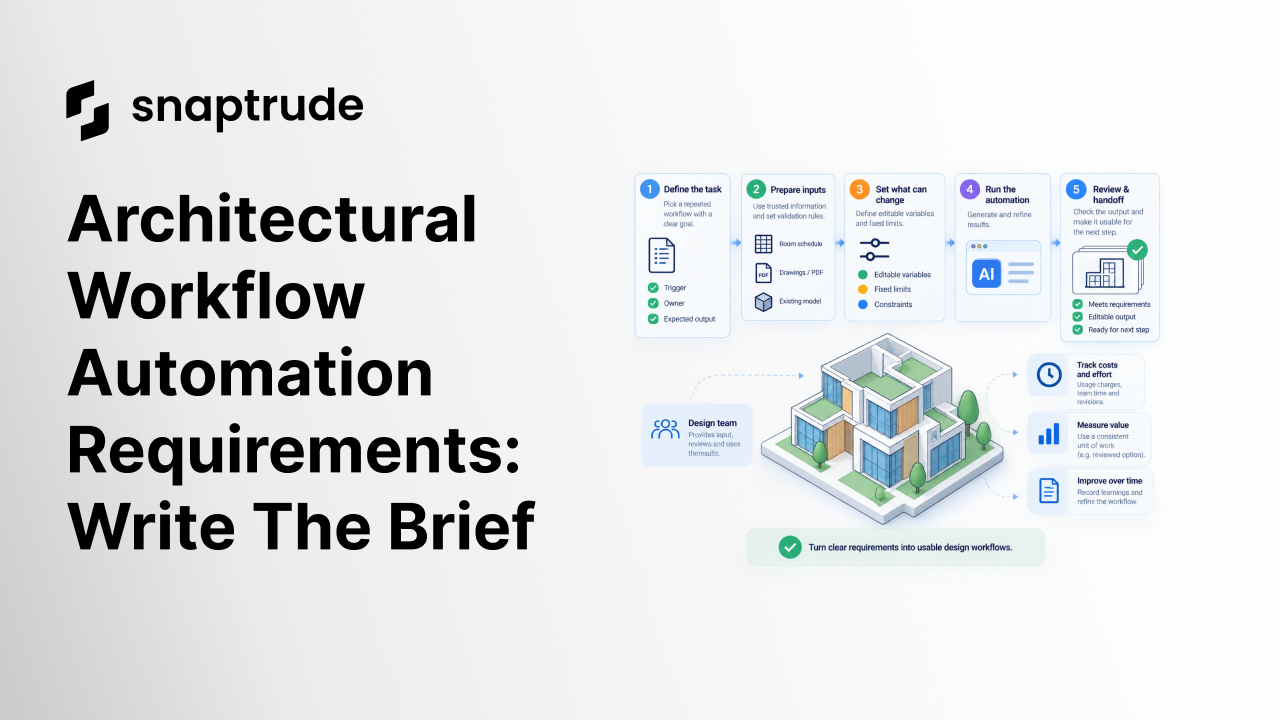
Architectural workflow automation requirements should describe the repeated task, trusted inputs, editable variables, fixed limits, human decisions, and required output. Attach examples showing what a correct result looks like and how a reviewer will check it. A useful brief lets a builder implement the workflow while keeping architectural judgment and exceptions visible to the team.
Where should architectural workflow automation requirements start?
Start with a repeated piece of work that the team can describe from beginning to end. Name its trigger, the person doing it, and the usable result they need.
A request to automate space planning is too broad to evaluate. A more useful starting point is to take a checked room schedule, create editable concept spaces, and return an area summary that a project architect can review. That sentence still needs detail, but it identifies an input, an action, an output, and a reviewer.
Observe the task as it happens. Which values does the designer copy? Which assumptions do they check? Where do they stop to ask a colleague? Those pauses contain requirements that may be absent from the spreadsheet or model.
Write down why the task repeats. Is the brief changing, are options being explored, or is the team repairing inconsistent information? Automating a repeated correction can preserve the upstream problem. Fixing the input definition may remove some of the work before any software is built.
The framework here is a proposed briefing method. It applies whether the eventual solution is a script, a configurable application, or an AI-assisted workflow. The implementation should follow the task's needs rather than determine them in advance.

What inputs should the brief define?
List the required information, its source, its meaning, and how the team will decide it is usable. A file extension alone is an incomplete input specification.
For a room schedule, define the required columns, units, identifier rules, and treatment of missing values. A blank area field may mean unknown, not applicable, or accidentally omitted. The automation needs an explicit response to each situation that matters.
For information extracted from a drawing, require a check against the source before it becomes a design instruction. Preserve the source reference so a reviewer can investigate a doubtful value. If the extracted data conflicts with the approved schedule, the workflow should surface the conflict and ask for a decision.
Include the scope of the source. A schedule for one department should not quietly become the program for the entire building. Likewise, a model view may hide elements that remain relevant to the requested calculation. The brief must say what the output includes, even when the working view shows less.
Specify who can approve changed inputs. Otherwise a corrected spreadsheet can enter the workflow while the reviewer still checks against the earlier version. A simple revision identifier prevents an avoidable argument about which brief the result was meant to satisfy.
How do you separate editable variables from fixed limits?
Identify what designers may change during exploration and what requires an explicit decision to change. Put both in the brief, with their expected effects.
An editable variable might be a target area, a layout orientation, or an option-specific preference. A fixed limit might be a required relationship that the team has already approved. These are illustrative categories; their status depends on the project and the authority behind the requirement.
Avoid burying useful variables inside a long instruction that only its author understands. A designer should be able to change a relevant input and predict which part of the result will be reconsidered. The brief can specify a form, table, or another clear way to expose those inputs without prescribing the underlying code.
Document dependencies. If changing a target area affects several rooms or an overall total, describe that relationship. If a value is shared across alternatives, say so. A designer needs to know whether an edit is local to the current option or changes a common assumption.
Finally, define the response to incompatible requirements. The useful behavior may be to stop and explain the conflict. Silently relaxing a fixed limit produces an output the reviewer cannot interpret confidently.
Try Snaptrude with a clearly specified design workflow.
What makes architectural workflow automation requirements testable?
A testable requirement identifies an observable result and a way to check it. Replace adjectives such as intelligent, seamless, or flexible with actions a reviewer can perform.
Attach an ordinary case with its expected outcome, then change one important condition at a time. Remove a required field and check whether the workflow asks for clarification. Change the orientation and inspect the result. Introduce conflicting requirements and check whether the process stops with an explanation the designer can act on.
These examples should remain small enough to diagnose. If a test fails, the team should be able to identify which requirement was violated without opening a whole project and searching for an explanation.
Acceptance criteria describe the contract between the requester and builder. They do not dictate a universal numerical tolerance. The responsible design team must choose suitable tolerances and make them explicit.
What should a compact automation brief contain?
Use one page for the core definition, then attach examples and source files as needed. The page should let a designer explain the task without describing the implementation.
For an illustrative program-to-concept workflow, the brief could read:
This is an example specification, not a description of an existing customer project or a claim that one product automatically performs every step. Adapt it to the actual task and remove fields that add no value.
Attach a short explanation of what is outside the first version. The team may need concept spaces now and detailed documentation later. Recording that boundary keeps a useful small workflow from becoming an undefined attempt to automate a whole project.
Who should approve the result and future changes?
Name a requester, a builder, and a reviewer, even when one person fills more than one role. Each role answers a different question: what work is needed, how will it run, and does the output satisfy the intended task?
The reviewer needs access to the inputs and acceptance examples. A builder's demonstration can explain how the process works, but the design team must also inspect what it produced. Preserve open questions instead of resolving them through an undocumented assumption.
When the brief changes, record the reason and the examples affected. A new unit convention may require several checks to be repeated. A visual preference may have a smaller impact. This makes maintenance proportional to the change rather than turning every revision into a complete restart.
Keep a manual continuation path for the initial trial. If the automation stops at an exception, the designer should know how to correct the input or continue the task. A clear stop can be more useful than an output that appears complete while concealing uncertainty.
How does this brief relate to Snaptrude?
Snaptrude connects program data with 3D design and supports area calculations, adjacency planning, concept modeling, BIM elements, and presentation. Those are concrete workflow capabilities a team can include in its evaluation. The brief should identify which of them matters to the intended result.
Our Apps and App Builder introduction explains the broader direction toward software shaped around a firm's methods. It is still necessary to verify current functionality against the task before promising an automated outcome.
For example, a requirement to pass work into Revit should include a test of the supported export and a receiving-team edit. A requirement for automatic conflict resolution needs separate capability verification. The brief makes those differences visible. The broader BIM evaluation guide can then help place the bounded workflow in an adoption decision.
Frequently Asked Questions
Q: What are architectural workflow automation requirements?
A: They define the task an automation must perform, including its trigger, trusted inputs, editable choices, fixed limits, outputs, and review conditions. A useful brief also explains exceptions and names the person who can resolve them. Attach examples with expected outcomes so the requester and builder can evaluate the same behavior without relying on a persuasive demonstration alone.
Q: How detailed should the first automation brief be?
A: Make the core definition short enough for the design team to understand, while attaching enough examples to remove important ambiguity. Describe one bounded task before extending it across a whole project. Specify information meaning, units, scope, and required output behavior. Technical implementation details can follow once the requester and builder agree on what successful work actually looks like.
Q: Which design inputs should remain editable?
A: Expose the variables designers need to change while exploring or revising the task. State which outputs each variable affects and whether it is shared across alternatives. Keep approved limits distinguishable from adjustable preferences. When a fixed requirement needs changing, route that decision to the appropriate person instead of letting the automation silently reinterpret it to complete a result.
Q: What should happen when requirements conflict?
A: The workflow should make the conflict visible, identify the affected inputs, and ask the named decision owner how to proceed. Preserve the original requirements and the resulting decision. In an early version, stopping clearly is often the right acceptance behavior. Automatically relaxing an important limit makes the output difficult to trust unless that relaxation was explicitly permitted and documented.
Q: Can this brief be used to evaluate Snaptrude?
A: Yes. Define a task using the relevant verified capabilities, such as connected program data, area calculations, concept modeling, BIM, or presentation. Then inspect the result against your acceptance examples. Confirm current availability before relying on a specific AI-assisted operation. The brief establishes the desired outcome; it should not assume that every requested automation already exists in the product.
Q: How should a Snaptrude handoff requirement be written?
A: Name the receiving application, the information needed, and the next edit or review the recipient must perform. Snaptrude supports Revit, Rhino, DWG, and IFC exports, but the required result depends on the project. Include a representative exchange in acceptance testing and record corrections. An available file format is the start of that requirement, not proof that it is satisfied.



