Last updated:
Why Rhino architecture workflows are still the safe harbour (and how to change that)
TL;DR
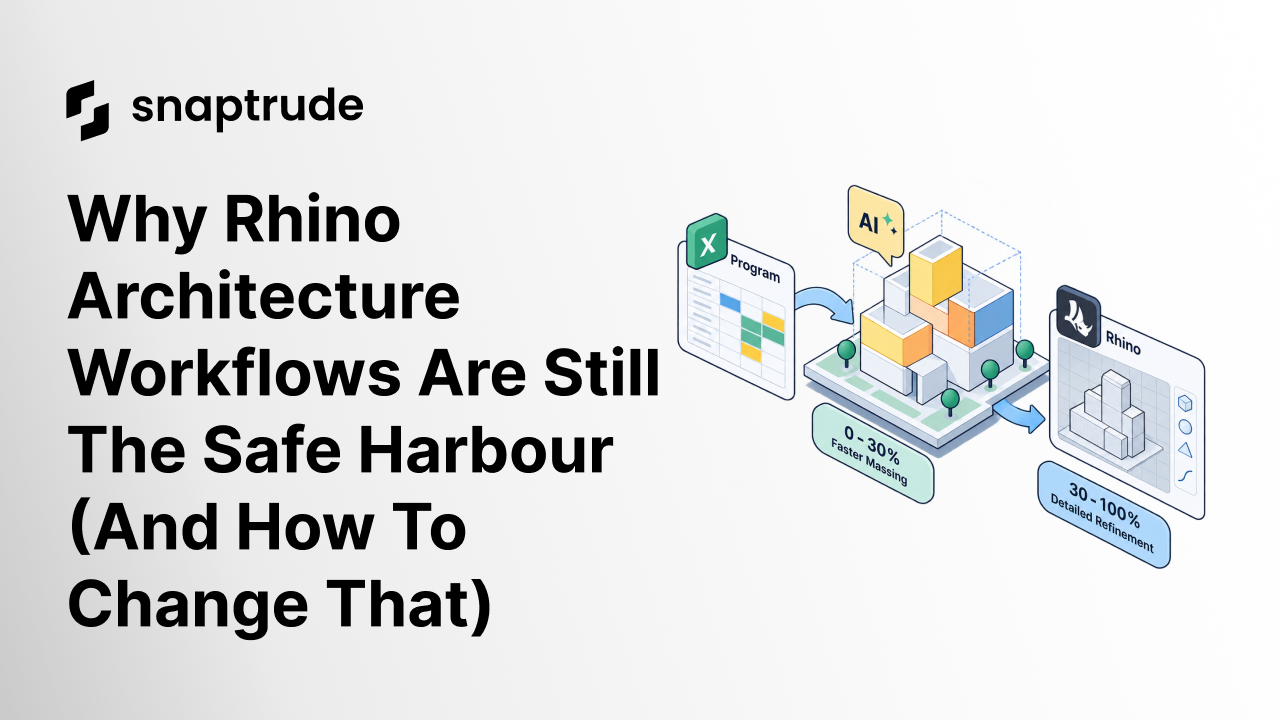
Rhino architecture workflows persist because Rhino has 25 years of refinement and a mental model architects trust implicitly. Newer AI-powered tools are not winning by replacing Rhino outright; they win by accelerating the 0-to-30% phase of the rhino 3d architecture workflow, exporting clean geometry, and letting trust build incrementally from there.
What does an architect's comment about Rhino actually reveal
The quiet admission architects make about Rhino reveals more about tool adoption psychology than any feature comparison. Satoshi, a designer at a mid-size architecture firm, put it plainly: "At the end of the day, if we can get some of the things we want to get in there, export it and then use those as just geometries" in Rhino.
That comment came while Satoshi was testing a newer tool on a live two-week RFP deadline. He hit real usability gaps: program import confusion, a broken stair tool, opaque locked footprint logic, and rigid area calculations. His response was not to abandon the new tool entirely. Instead, he repositioned it as an accelerant for the earliest phase, a faster way to go from program to massing before handing off to Rhino for detailed refinement.
The newer tool was genuinely faster than Rhino for generating initial massing options with program-driven space allocation. But when it came to detailed refinement, adjusting geometry with precision, layering in complex adjacencies, and exporting cleanly to rendering tools, the team still trusted Rhino more.
This is the trust gap every new architecture tool faces. Users adopt new tools for the phase those tools are best at, but escape to familiar tools when they need control, flexibility, or confidence that the tool will not break under deadline pressure. Any rhinoceros architecture software conversation has to start here.
Why does Rhino dominate the rhino architecture workflow?
Rhino's competitive advantage is not features. It is flexibility without punishment. The tool lets architects model anything, any way they want, without imposing constraints or breaking unexpectedly. That reliability compounds over time into something more valuable than any individual capability: trust.
Satoshi referenced this implicitly when he compared Rhino to SketchUp in terms of intuitive modeling: "There are other things I didn't quite figure out whether or not I was missing something." That phrase, "whether or not I was missing something," captures the trust gap precisely. In Rhino, if something does not work, architects assume they need to learn a different command or approach. In a newer tool, when something does not work, architects assume the tool is broken or incomplete.
This is not a feature gap. It is a maturity gap. Rhino has 25 years of refinement behind it. Architects have solid mental models for how it behaves. They trust that if a workflow feels clunky, there is probably a better way to do it within the tool. A newer product does not have that reputation yet, so when a workflow feels clunky, users assume it is a bug or a missing feature. And in many cases, they are right.
What it means to compare CAD vs BIM helps clarify why the rhino vs revit architecture debate is only part of the story: the real question is whether any tool can build the same depth of trust Rhino has accumulated over decades of use in architecture studios worldwide.
Is the "escape hatch" to Rhino a failure mode or a feature?
Most architecture software tries to fight Rhino directly, positioning as a full replacement: "You do not need Rhino anymore; our tool does everything Rhino does, plus BIM, plus collaboration, plus AI." That positioning fails because it forces a binary choice. And architects default to Rhino because the switching cost is too high and the trust is not there yet.
The smarter strategy is to embrace the escape hatch. Position a new tool as the best option for the first 30% of the workflow, knowing architects will export to Rhino for the final 70%. Here is why this works.
Lower adoption friction: architects do not have to abandon Rhino. They simply add a new tool upstream. The switching cost drops from "replace our entire modeling workflow" to "add a faster front-end tool before we open Rhino."
Playing to genuine strengths: newer AI-powered tools are genuinely faster than Rhino for Excel-to-3D space allocation, AI-driven adjacency planning, and automated block-stacking. They are not trying to be freeform NURBS modelers and they should not try. Leaning into program-driven, constraint-based workflows that Rhino does not handle well is the right move.
Trust builds incrementally: once architects trust a newer tool for the 0-to-30% phase, they start pushing the boundary. "Can we take this a little further before exporting?" Over time, the export point moves from 30% to 50% to 70%. Eventually, architects realize they are only opening Rhino for rendering or final documentation.
Interoperability as a feature: instead of treating export as a fallback, marketing it as a strength reframes the entire value proposition. "Generate program-driven massing in 25 minutes, export clean geometry to Rhino, and preserve your team's existing workflows." That is a selling point, not a limitation.
Satoshi's comment, "export it and use those as just geometries," is not a criticism. It is validation that the workflow makes sense. He is not asking a newer tool to be Rhino. He is asking it to be the fastest way to go from Excel program to 3D massing, with a clean export so his team can take it the rest of the way.
Snaptrude, an AI-powered, cloud-native BIM design tool, is built around exactly this incremental adoption model. The workflow from spatial program to massing takes minutes, not hours, and the export to Rhino or Revit preserves clean geometry that teams can immediately refine.
What can other architecture tools learn from this pattern?
The mistake most new architecture tools make is trying to replace everything at once. Positioning as "the only tool you'll need" triggers defensive reactions. Architects think: "I have spent 10 years mastering Rhino. I am not abandoning that investment for a two-year-old startup tool that might break during a deadline."
The smarter play is to position as the best tool for a specific phase, with clean export to the tools architects already trust. Lower the adoption barrier by reducing perceived risk.
Several tools have succeeded with exactly this strategy. Grasshopper did not try to replace Rhino. It positioned as a parametric layer on top of Rhino. Architects adopted it because they did not have to abandon the rhinoceros architecture software they already knew; they built on it. Enscape did not try to replace Revit. It positioned as a real-time rendering plugin living inside Revit. Architects adopted it because it removed the friction of exporting to separate rendering software. Midjourney did not try to replace Photoshop. It positioned as an AI tool that generates concept images architects then refine in Photoshop, accelerating the 0-to-1 phase without changing the final output workflow.
The pattern is consistent: new tools win by accelerating one phase of the workflow and exporting cleanly to the next tool in the chain. Once adoption reaches critical mass, architects start asking "can we skip the export step?" At that point, the tool has earned the trust to expand its scope. This is the path any credible rhino architecture alternative has to follow.
The double data entry tax that comes from maintaining parallel workflows makes clear why the "embrace the export" strategy is not a concession. It is the most practical path to becoming indispensable before asking for more of the workflow.
How does Snaptrude fit into the Rhino architecture workflow?
Snaptrude handles the phase where Rhino is weakest: translating a spatial program into a 3D massing model with program-driven constraints, AI-powered adjacency planning, and automated space stacking. Rather than competing with Rhino for detailed modeling control, Snaptrude accelerates everything that happens before a team opens Rhino, which is typically the most time-pressured, least repeatable part of the process.
The positioning is intentional. "Snaptrude generates program-driven massing in 25 minutes. Export to Rhino, SketchUp, or Revit with clean geometry and continue your workflow. Use Snaptrude for the phase it is best at, early-stage space allocation, then refine in the tools your team already knows." That framing lowers adoption friction, plays to genuine strengths, and builds trust incrementally rather than demanding it upfront.
Over time, as users push the export boundary further downstream, the tool earns the right to say "you might not need Rhino for this anymore." But that is a multi-year play, not a year-one pitch. For now, the winning message is that Snaptrude is the fastest way to go from Excel program to 3D massing, with clean export to Rhino. Users discover on their own that they are exporting less and less as confidence grows.
For architects curious about how AI is reshaping the broader design process, the top AI tools for architects in 2026 provides a useful orientation to where Snaptrude sits relative to the wider field of AI-powered design tools.
How does a traditional Rhino workflow compare to an AI-powered early-stage workflow?
Workflow StageTraditional Rhino ApproachAI-Powered Tool (Snaptrude)Program inputManual box modeling from spreadsheetDirect Excel or program import, auto-allocated to 3DMassing iterationBuild each option by handGenerate multiple massing options in minutesAdjacency planningManually arranged based on judgmentAI-driven adjacency suggestions from program dataExport qualityNative .3dm files, high fidelityClean geometry export to .3dm, .rvt, or .skpCollaborationSingle-user file, shared via email or cloud driveReal-time multi-user cloud modelTrust level (year 1)High: 25 years of refinement and community knowledgeGrowing: strongest for 0-to-30% phase, expandingTime to first massing optionHours to days depending on complexity25-30 minutes for program-driven massing
Frequently Asked Questions
Q: Why do architects still revert to Rhino when a newer tool hits friction?
A: Rhino has 25 years of refinement and a large community sharing workflows, plugins, and troubleshooting knowledge. When something does not work in Rhino, architects assume a knowledge gap, not a tool failure. Newer tools have not yet built that reputation, so architects revert to Rhino when they hit friction. Cloud-native BIM tools like Snaptrude address this by excelling at specific phases rather than demanding wholesale replacement.
Q: What is the difference between Rhino and Revit in architecture?
A: The rhino vs revit architecture distinction comes down to flexibility versus structure. Rhino excels at freeform, constraint-free modeling and is the preferred tool for complex geometry and early-stage massing exploration. Revit excels at structured, data-rich documentation and BIM coordination. Most firms use both: Rhino for design development and Revit for construction documents. AI-powered tools like Snaptrude are increasingly bridging the gap at the earliest massing phase before handoff to either tool.
Q: How long will it take for newer tools to handle most of the workflow currently owned by Rhino?
A: It depends on how quickly a newer tool closes usability gaps and builds feature depth. Architects who encounter bugs during RFP deadlines reinforce the habit of exporting to familiar tools. As those issues resolve and features mature, the export boundary moves downstream. A realistic timeline for a newer tool to handle 70% or more of the workflow is two to three years of sustained product maturity and community trust-building.
Q: What counts as "clean geometry" when exporting to Rhino?
A: Clean geometry means files that import into Rhino without errors, overlapping surfaces, or broken edges. Architects need to immediately continue refining, not spend 30 minutes repairing the exported model. If the export is messy, firms stop using the upstream tool entirely. This is why export quality is not a footnote for rhinoceros architecture software alternatives; it is a prerequisite for adoption.
Q: Will AI-powered tools replace Grasshopper?
A: Not replaced, but increasingly supplemented. Grasshopper's parametric logic remains powerful for complex geometry generation, but AI-powered tools are taking over the earlier, program-driven phase: translating spatial programs into constrained 3D massing without requiring scripting expertise. Firms are adding AI tools upstream of Grasshopper for the initial layout logic, then using Grasshopper for finer parametric control. Snaptrude fits this upstream phase well.
Q: What phase of the workflow is Snaptrude purpose-built for, relative to Rhino?
A: Snaptrude, an AI-powered, cloud-native BIM design tool, is purpose-built for the phase Rhino does least efficiently: going from a spatial program or Excel spreadsheet to a constrained, program-driven 3D massing model. Rhino requires manual box modeling from scratch. Snaptrude allocates space automatically, suggests adjacencies based on program logic, and stacks floor plates parametrically. The output exports cleanly to Rhino for detailed refinement, so teams keep their existing workflows intact.
Q: How does Snaptrude fit into a team's existing Rhino or Revit workflow?
A: Snaptrude generates program-driven massing quickly, then exports clean geometry to Rhino, Revit, or SketchUp for detailed design development. Teams do not have to rebuild geometry from scratch after massing is approved. As trust in Snaptrude grows, firms push the export point further downstream, using Snaptrude through schematic design before handing off to documentation tools.


