Last updated:
Design Option Governance: Keep Alternatives Legible
TL;DR
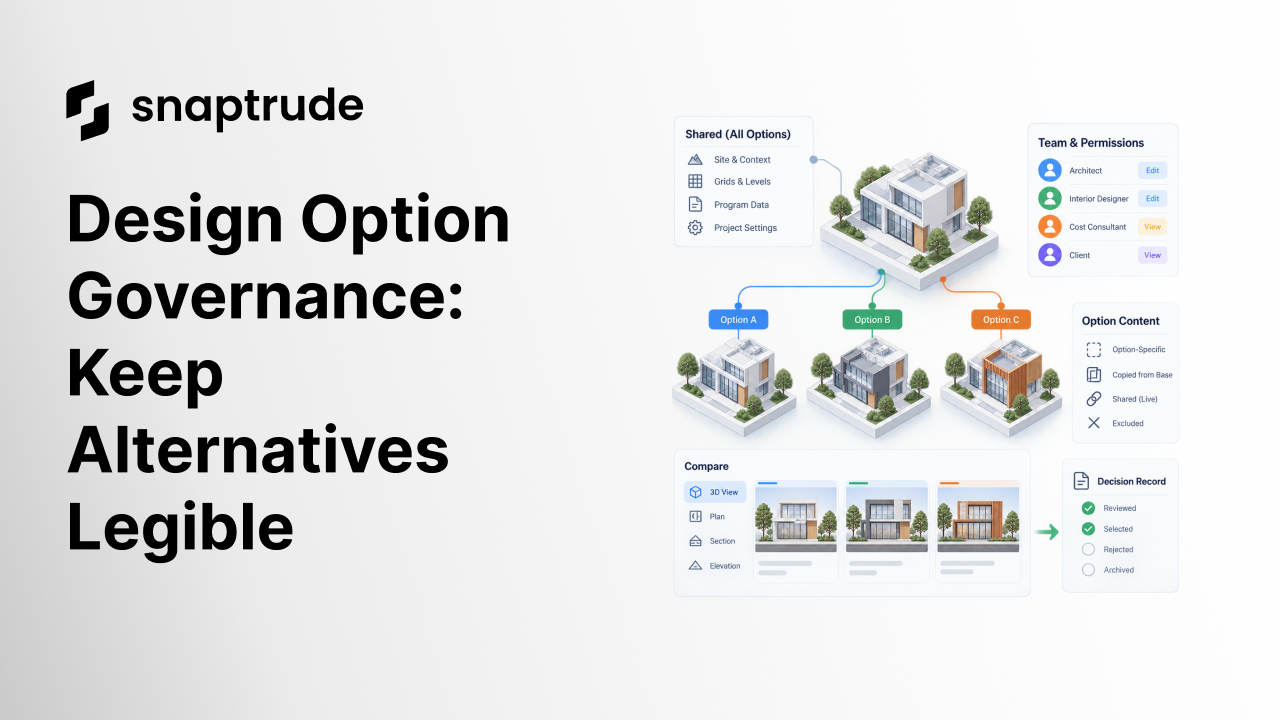
Design option governance defines what is shared, copied, excluded, or unique across alternatives; who can change each scope; how views and data behave; and how decisions are recorded. Set those rules before creating the second option. Otherwise, comparison becomes a forensic exercise in guessing which differences are intentional.
What is design option governance?
Design option governance is the operating agreement for creating, editing, reviewing, and retiring architectural alternatives. It establishes the option set, shared project context, ownership rules, view behavior, data scope, permissions, naming, and decision record. The goal is not bureaucracy. It is to keep every alternative understandable while the design is changing quickly.
Begin with the decision the option set must support. A facade material study, core-position study, unit-mix study, and whole-building concept study do not need the same structure. Name the variable being explored, the constraints that remain fixed, the people who can edit it, and the date or review that closes the branch.
Then classify model content into four states:
The classification must describe behavior, not just appearance. If a site boundary is shared, does editing it update every option? If a core is copied, when does it stop inheriting changes? If a view is reused, does it keep the same camera but display option-specific geometry? Answer those questions before the team assumes the software will choose correctly.
Separate project context from option content. Site reference, grids, levels, governing program assumptions, and agreed constraints may need one controlled source. Geometry, layouts, facade studies, or program allocations may branch. The exact boundary varies, but it should be explicit and reviewable.

How do you set up design option governance before modeling?
Write an option charter on one page. Include the question, fixed constraints, allowed variables, baseline option, owner, contributors, review date, and success criteria. If two alternatives answer different questions, they probably belong in separate option sets.
Create an ownership matrix. Assign a named role for shared context, each option, program data, views, and comparison outputs. “The team” is not enough when a shared change can affect several branches. Define who can approve a shared change, who must be notified, and whether the change propagates automatically or requires a deliberate merge.
Use a stable naming structure with a short option ID, human-readable description, status, and revision. Avoid names such as “final,” “new,” and “latest.” Those labels describe a moment, not the option’s design intent. A name such as “B03 central-core compact plate” makes the studied variable visible without exposing a client or project in reusable guidance.
Define the option lifecycle:
Do not delete alternatives just to reduce clutter. Retire them with a short reason. A decision record is more useful when the team can see what was rejected and why without reopening uncontrolled duplicate files.
Use Snaptrude to explore editable BIM alternatives with the project team.
How should design option governance handle views and data?
Views need scope. A comparison works best when equivalent plans, sections, elevations, and 3D views share camera, crop, style, scale, and annotation intent. The geometry and option-specific labels should change, while the visual frame remains comparable. If a reviewer must mentally correct for different camera positions, the presentation introduces noise.
Distinguish a saved view from the designer’s temporary working state. Switching alternatives should not unexpectedly overwrite the current orientation or impose a stale visibility state. Conversely, deliberately opening a saved review view should restore the accepted comparison setup.
Program, area, cost, and performance data also need ownership. Decide whether each value is project-wide, inherited from a baseline, or calculated within an option. Comparison data that combines several alternatives should live in a separate comparison layer rather than pretending to belong to one branch.
Record the source and revision behind every comparison value. A difference in area may reflect a design choice, a changed calculation rule, or an outdated program target. The overview of architectural programming in Snaptrude explains how program information can become part of the design workflow.
Comments and decisions should point to both the option and the reviewed view or object. If a comment opens in the wrong branch, its location and meaning may be lost. Carry the option ID into exports, images, and meeting records so downstream artifacts remain traceable.
Which design option governance controls prevent duplicate-file chaos?
The controls should make ordinary work faster. If maintaining the option record takes longer than understanding the alternatives, simplify it. Keep one authoritative register and link to model views or evidence rather than duplicating full descriptions across files.
At each review, ask whether all options still address the same decision and share the same fixed constraints. If one branch has changed the brief, site assumption, area method, or deliverable stage, label the change. Do not present incomparable options as a fair choice.
For product context, see how architecture design software can support options without multiplying files. Governance makes the inputs trustworthy. A separate comparison matrix can then make the selection explicit.
How does Snaptrude support governed design alternatives?
Snaptrude supports browser-based architectural design, real-time multiplayer collaboration, massing studies, program data connected to 3D design, area calculations, client-ready presentations from a live model, and several export paths. Those capabilities can support collaborative option development and review.
Product facts do not replace a project’s option charter, permission model, or decision record. Teams should establish the governance rules, configure the model around them, and test what shared and copied content does before a live review. Keep sensitive names and project details out of reusable templates and public distribution.
Frequently Asked Questions
Q: What is design option governance?
A: Design option governance is the set of rules for creating, owning, editing, reviewing, selecting, and retiring architectural alternatives. It defines the decision being studied, fixed constraints, shared and option-specific content, permissions, view behavior, data scope, naming, status, and decision evidence. Its purpose is to keep differences intentional and comparisons trustworthy while several branches evolve.
Q: What should be shared across architectural design options?
A: Share information that must remain one authoritative project context, such as agreed site references, levels, grids, or governing constraints, when the workflow supports that behavior. Copy content that needs an independent branch. The boundary depends on the study. Record who owns shared changes and test how updates affect every option before the team relies on propagation.
Q: How is design option governance different from option comparison?
A: Governance structures the alternatives before review. It defines scope, ownership, shared content, views, data, permissions, and lifecycle. Comparison evaluates the resulting options against criteria. A strong scoring matrix cannot repair uncontrolled branches with different assumptions or stale data. Governance makes the inputs comparable; comparison turns those inputs into an explicit selection decision.
Q: How should teams name design options?
A: Use a stable short ID plus a plain-language description of the studied variable, followed by status or revision where needed. Avoid “final,” “latest,” and personal names. The option name should remain useful after the meeting that created it. Apply the same identifier to model views, exports, comparison records, comments, and decision notes so artifacts remain traceable.
Q: Can Snaptrude support collaborative option development?
A: Snaptrude provides real-time multiplayer collaboration, massing studies, program data connected to 3D design, area calculations, and live-model presentations. These verified capabilities can support teams exploring and reviewing alternatives today. The project still needs explicit governance for ownership, shared and copied content, permissions, status, comparison criteria, and the final decision record.
Q: Does Snaptrude automatically create a design option governance plan?
A: Verified product facts do not establish automatic creation of a complete governance plan. Teams should write the decision, scope, ownership, permissions, view standard, data rules, and lifecycle themselves, then configure and test the chosen workflow. Use Snaptrude’s collaborative BIM capabilities to carry out the work, but keep human accountability for shared changes and option selection.
Start a Snaptrude project with one option charter and one named decision owner.



