Last updated:
How a 2-week RFP deadline forced a rigorous bim software evaluation rfp deadline stress test
TL;DR
A rigorous bim software evaluation rfp deadline stress test surfaces bugs, workarounds, and vendor responsiveness that no sales demo ever will. When an architect tested a new BIM platform on a live proposal with a two-week burn, five distinct usability failures emerged, from broken stair tools to opaque constraint logic. The vendors who responded with transparency and immediate workarounds proved more valuable than the tools that performed perfectly in controlled conditions.
What does a real bim software evaluation rfp deadline stress test actually look like?
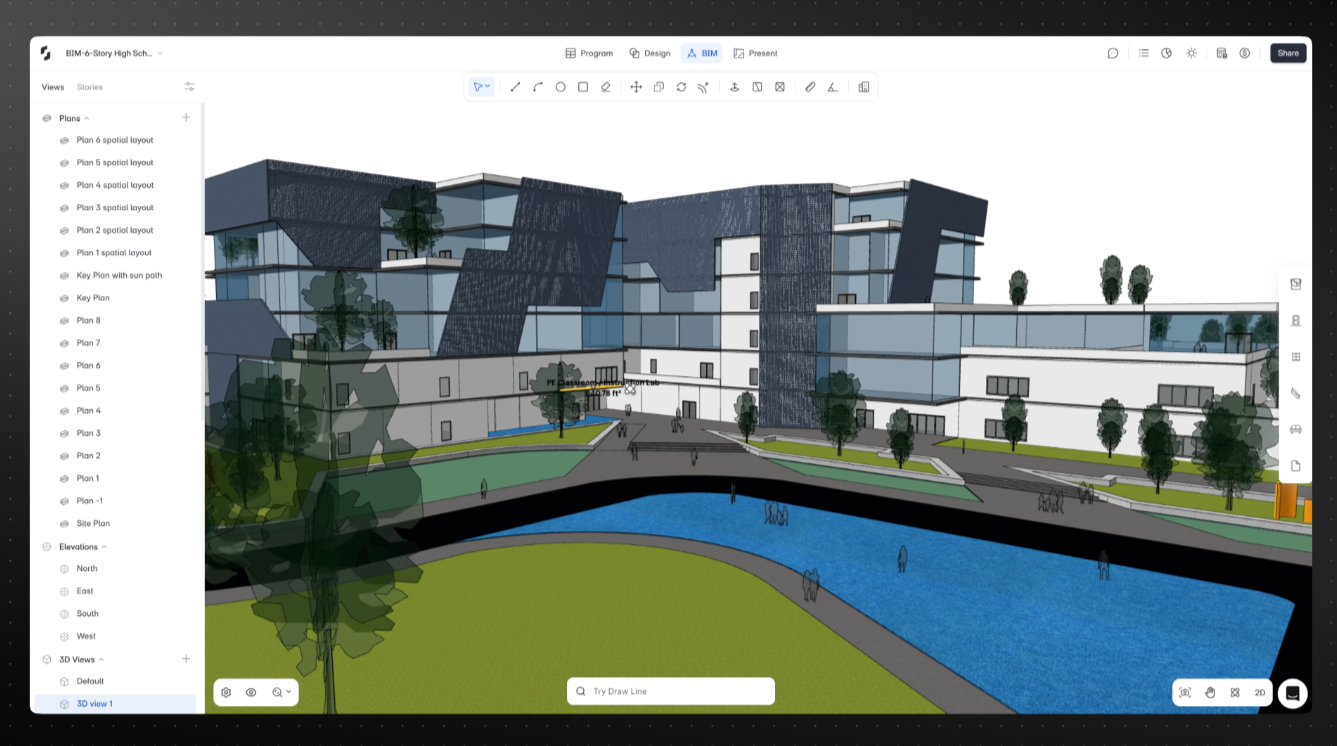
A real evaluation under deadline pressure looks nothing like a vendor demo. Satoshi, a lead architect at a mid-size firm, set up the test deliberately: take a new BIM platform, throw it into a live RFP with a two-week total burn, one week for design content, and generate three massing options showing programmatic layout variations. No sandbox. No sample data. Real client, real consequences.
He described the situation plainly: "This is a pursuit. The burn for the whole proposal is two weeks. The content needs to be done this week. I need to have fire under my you-know-what in order to do stuff because there's just too many things going on. It's a self-inflicted wound, but it's a great opportunity because it's a relatively simple program."
This is how architecture firms actually evaluate software. Not in curated demos with perfect workflows, but under deadline pressure with messy inputs and zero tolerance for tools that slow them down. Knowing how to evaluate BIM software before a real deadline forces the question is useful, but few firms create the forcing function Satoshi used here.
The tool's job was to accelerate the massing workflow or get abandoned halfway through. What emerged from that test was a clear picture of every usability gap that most software demos are designed to avoid.
What are the most common failure modes when evaluating BIM tools under deadline?
Five distinct failures surfaced during the two-week evaluation, each revealing a different category of usability risk that architecture firms should screen for before committing to a tool.
Program import confusion. Satoshi imported an Excel program into the platform's Program Mode using an AI interpreter. The tool generated additional spaces that were not in the original program. The AI was inferring missing spaces based on typical architectural programs, adding corridors and restrooms that were not requested. The fix required adding a note to the import prompt: "Just use the program as is." The lesson is simple: AI features need explicit override controls. Users want intelligent defaults most of the time, but they also need a direct mode for exact imports.
Stair tool completely broken. Multiple selection and editing failures meant the stair tool was functionally unusable: elements could not be grabbed in 2D or 3D, tab-cycling failed, parameters would not update when edited. The vendor's technical team confirmed it on the spot: "This is a bug. I'll get this sorted." The workaround, drawing space boxes named "stair" as placeholders, was sufficient for an early-stage proposal that did not need actual stair geometry.
Locked footprint logic opaque. Locking a space's footprint area to maintain square footage while adjusting geometry worked inconsistently. Sometimes the system allowed edits; sometimes it blocked them with an error message. The underlying logic, that adjacent or touching spaces cannot be resized without risking overlap, was sound. But there was no visual feedback explaining why the constraint fired in some cases and not others. Constraint-based geometry editing requires clear state communication.
Area calculations too rigid. A road element drawn as a space to visualize site circulation was counted in net area calculations, throwing off program totals. Renaming the element "road" excluded it from calculations. The fix worked, but the categorization logic was not surfaced in the interface. Gross vs. net, circulation vs. program: these distinctions are fundamental to architecture and need explicit, visible categorization options.
No master program across design iterations. Creating three design options with the same program but different spatial arrangements exposed a core workflow gap. If a client amended the program, every option had to be updated manually, because each option was treated as an independent project with no shared source of truth. Parametric design iteration is expected behavior in 2025; treating each option as a separate project breaks the iteration loop.
Why does vendor response matter as much as the tool itself during a BIM software pilot test?
Vendor response during a live pilot test matters because architecture firms do not have time to wait for the next release cycle. When a tool breaks under deadline pressure, the only question is whether the vendor can unblock the work right now.
Three behaviors defined the response in this evaluation. First, immediate transparency: the technical team did not deflect or claim the behavior was by design. They confirmed bugs on the spot. Users trust vendors who admit problems more than vendors who perform certainty. Second, immediate workarounds: for each broken feature, the team provided a path forward that worked within the current deadline, not a promise that the next release would fix it. Third, post-call follow-through: the team offered to share export workflows, help documentation, and schedule additional support calls as needed during the trial.
The result was a qualified outcome: Satoshi ended the evaluation with "This was very helpful. Thank you very much. Really appreciate it," and indicated he would investigate what it would take to move toward an agreement. That is not a buyer who found a perfect tool. That is a buyer who found a team that would be a reliable partner when things broke.
This dynamic is described well in the RFP workflow research on rapid proposal production: the firms that move fastest under deadline pressure are the ones with tools and vendor relationships that remove friction rather than add it.
How should architecture firms structure a BIM software selection process to surface real limitations?
The most effective BIM software selection criteria start with a deliberate forcing function: test on a live project with real stakes, not a sandbox trial with clean data. Satoshi's approach, throwing the tool into a live RFP with a one-week content deadline, is exactly the kind of evaluation that reveals what demos hide.
Four practices structure a rigorous evaluation. First, use real project data, not sample files. Import the actual Excel program from a current pursuit. If the tool misinterprets it, you learn that immediately. Second, test every tool the proposal requires: massing generation, program overlay, area calculations, export to presentation formats. A tool that fails on stairs during an RFP will fail on stairs in production. Third, schedule support availability in advance. Tell the vendor: "We're testing this on a live project with a two-week deadline. Can we schedule calls as issues come up?" The answer reveals vendor culture faster than any reference call. Fourth, document every workaround. Workarounds that are acceptable during a trial become friction in production. A tool that requires five workarounds to complete a basic massing study is not production-ready regardless of what the demo showed.
The firms that run evaluations this way make better purchasing decisions and avoid the six-month regret cycle of adopting a tool that performs in demos and fails in production.
How does traditional BIM software evaluation compare to a live deadline stress test?
Evaluation DimensionTraditional Demo / Sandbox TrialLive RFP Deadline Stress TestData usedVendor-prepared sample filesReal project program, real client contextWorkflow testedScripted happy-path sequenceActual proposal workflow from import to exportBug exposureNear zero (vendor controls environment)Full exposure: all edge cases surface immediatelyVendor response testedNot testedDirectly tested: response time, workaround quality, honestyIteration workflowSingle-option walkthroughMulti-option generation with program amendmentsArea calculation accuracyNot tested under real conditionsTested with real gross/net/circulation distinctionsDecision confidenceHigh confidence in ideal stateHigh confidence in production realityTime to disillusionmentPost-purchase, during onboardingDuring evaluation, before contract
How does Snaptrude handle the bim software evaluation rfp deadline challenge?
Snaptrude, an AI-powered, cloud-native BIM design tool, is built for the kind of evaluation Satoshi ran: production conditions, real data, and compressed timelines. The Excel-to-3D workflow at the core of Snaptrude's Program Mode is designed to take a real project program and generate massing options directly, without the manual intermediate steps that slow early-stage proposals.
The AI program interpreter in Snaptrude includes the inference behavior that Satoshi encountered, adding contextually appropriate spaces based on program type, with an override option for users who need exact 1:1 imports. The locked footprint constraint system, which maintains square footage while allowing geometry edits, is being updated to surface clearer visual feedback when adjacent-space logic prevents an edit. The stair tool bug surfaced during Satoshi's evaluation was confirmed, prioritized, and addressed.
What the evaluation also demonstrated is the support model that surrounds the tool. Trial users working on live projects with real deadlines get direct access to technical support, not a ticket queue. That responsiveness, the ability to get a workaround in the same call where a bug is confirmed, is part of what makes a cloud-native BIM platform different from legacy desktop tools with annual release cycles. For firms exploring early-stage design tools, the AI space planning workflows in Snaptrude are specifically designed for the massing-to-program overlap that RFP proposals require.
Frequently Asked Questions
Q: How should a firm stress-test BIM software before committing to it?
A: Test program import with your actual Excel data, not sample files. Run area calculations against a real program with gross, net, and circulation distinctions. Generate at least two massing options and attempt a program amendment across both. Test export to your existing presentation workflow. Any failure under these conditions will recur in production. Snaptrude, an AI-powered, cloud-native BIM design tool, is built for exactly this kind of live evaluation.
Q: How long should a BIM software pilot run to be meaningful?
A: A meaningful pilot requires at least one complete project cycle for the phase you are evaluating, typically two to four weeks for early-stage massing and programming. A single demo or one-day trial is not sufficient to surface edge cases in area calculations, constraint logic, or multi-option iteration workflows. The firms that make the best BIM software selection decisions are the ones that test under deadline pressure, not in controlled environments.
Q: What criteria matter most when evaluating BIM software for RFP work?
A: For RFP work specifically, the most important criteria are program import accuracy, massing generation speed, area calculation control (gross vs. net vs. circulation), multi-option iteration without manual duplication, and vendor support response time during the trial. Polished demos are not a useful selection criterion. Cloud-native BIM tools like Snaptrude are designed to compress the time from program to massing option, which is the core RFP workflow.
Q: What was the outcome of the live evaluation with the architect?
A: The evaluation did not produce an immediate purchase commitment, but it produced a qualified outcome. The architect indicated he would investigate what it would take to move toward an agreement and planned to continue testing, including exporting block-stack geometries to Rhino for detailed refinement. That adoption pattern, using a new tool for the early massing phase and exporting to a trusted tool for refinement, is common when evaluating BIM platforms under real conditions.
Q: Why do firms revert to familiar tools during a software trial?
A: Firms return to familiar tools when new platforms fail under deadline pressure without adequate vendor support. If a stair tool breaks during an RFP and the vendor cannot provide a workaround in the same conversation, the team abandons the new tool and defaults to what they know.
Q: How does Snaptrude's support model differ from legacy BIM vendors during a trial?
A: Legacy desktop BIM tools have annual release cycles, which means bugs confirmed during a trial may not be fixed for months. Snaptrude's cloud-native architecture allows the team to push fixes and workarounds in days, not release cycles. The support model for trial users working on live projects provides direct access to technical staff, not a ticket queue. That combination of rapid iteration and responsive support is the core difference when evaluating BIM tools under deadline.
Q: What was the master program limitation identified during evaluation, and how is it being addressed?
A: The master program limitation that emerged during this evaluation is a known workflow gap: each design option currently operates as an independent project, requiring manual updates when a client amends the program. Snaptrude is actively developing shared-program functionality to allow a single source of truth across multiple massing options. For teams evaluating tools now, the workaround is to use a saved template as a starting point for each option.


