Last updated:
Why Site Analysis Still Takes Hours (And What We Did About It)
Site analysis is the process of gathering regulatory, environmental, and contextual data about a project site before design can begin. It includes zoning codes, setbacks, height limits, FAR or FSI values, road access, sun and wind orientation, and local code requirements. In most firms, it still happens manually.
Why does site analysis still feel like it belongs in 2005?
Here's what we kept hearing from architects: the first few hours of any new project are spent not designing, but researching.
You open Google Maps. You find the parcel. You search for the municipal zoning map. You cross-reference it with a PDF that may or may not be current. You look up setback requirements in a table that was clearly formatted in the early 2000s. You check height restrictions. You figure out parking ratios. You pull up Google Street View to understand the surrounding context.
And if you're working on a site in a different country, the terminology changes. FAR becomes FSI. Feet become meters. The zoning codes follow completely different classification systems. Conservation areas, seismic zones, flood risk maps, all stored in different places, formatted differently, governed by different authorities.
For a single site, this process can take an experienced architect anywhere from two to six hours. For a junior team member, it can take a full day. This is one of the reasons we built Snaptrude from scratch as a cloud-native platform: the fragmented workflows in architecture have real costs, and site research is one of the worst offenders.
Here's the thing: this isn't a knowledge problem. Most architects know what data they need. The problem is that gathering it requires navigating a dozen disconnected sources, none of which talk to each other.
If you run a firm, you know the cost of this. Every new project starts with the same slow data-gathering phase. Your most experienced people end up spending time on research instead of design. And when a project doesn't move forward, those hours are gone.
Key Takeaway: Site analysis is slow not because the work is hard, but because the data is scattered across disconnected sources. The task is the same everywhere, but the sources and formats change with every city and every country.
What would it look like if site analysis just worked?
We asked ourselves a specific question: what if an architect could drop a pin on a map, type a single prompt, and get back a complete, structured site analysis in seconds?

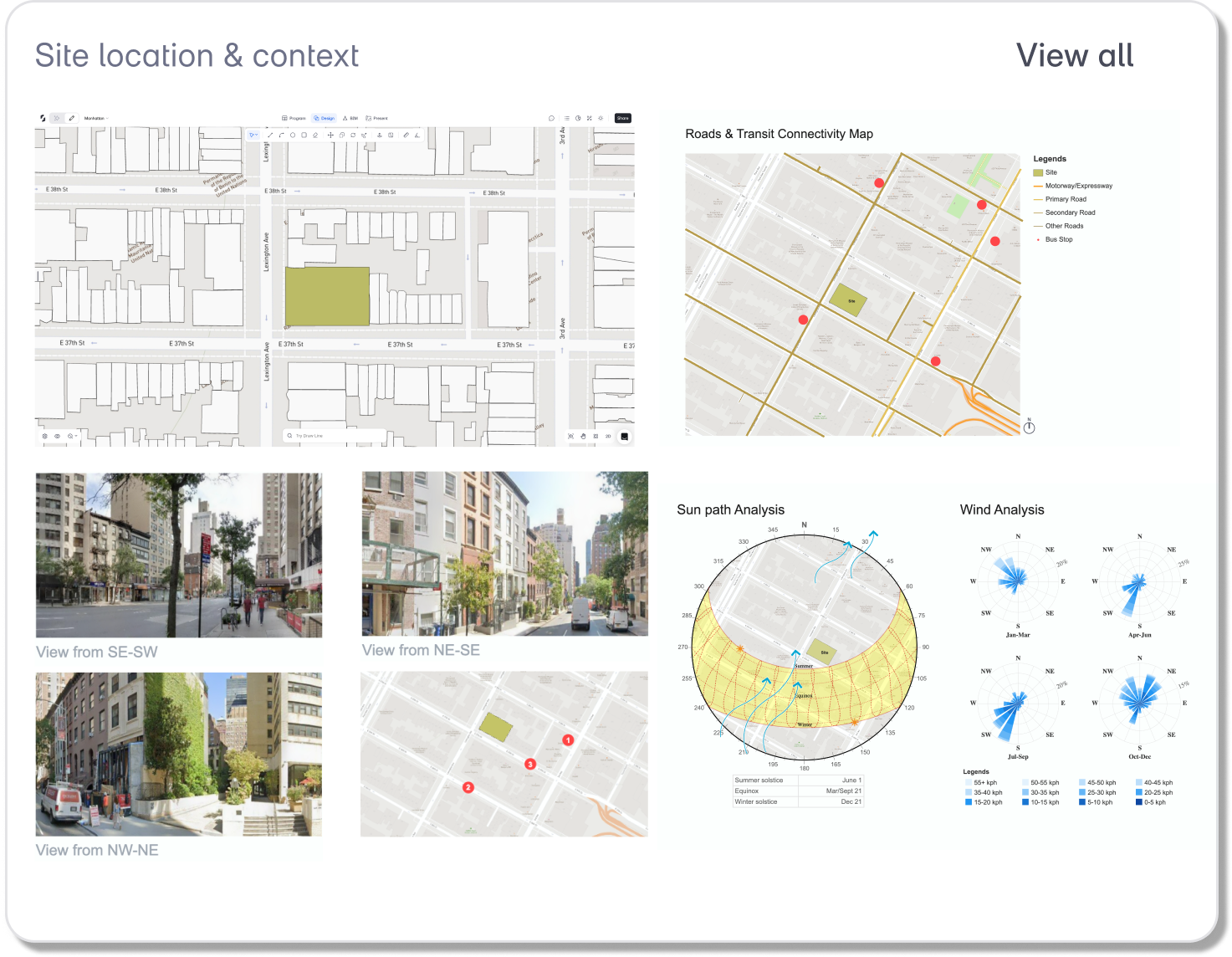
Not a summary. Not a chatbot answer. A structured table with zoning district, FAR, setbacks per floor, height limits, lot coverage, parking requirements, environmental constraints, and confidence levels for every data point. Plus auto-generated analysis sheets for roads and transit, street-level photos, and sun and wind orientation.
That's what we built. We call it the Site Analysis Agent. It's one of the AI agents we introduced with Snaptrude AI, designed to handle the parts of early-stage design that are tedious and time-consuming but critical to get right.
The agent works inside Snaptrude's design environment. You select a site, type something as simple as "analyze this site," and the agent reads the site's location, pulls data from licensed zoning and parcel databases, cross-references local building codes, and returns a full analysis. It generates three visual analysis sheets: a road and transit network map, a set of street-level photos arranged around the site, and a sun path and wind rose diagram.
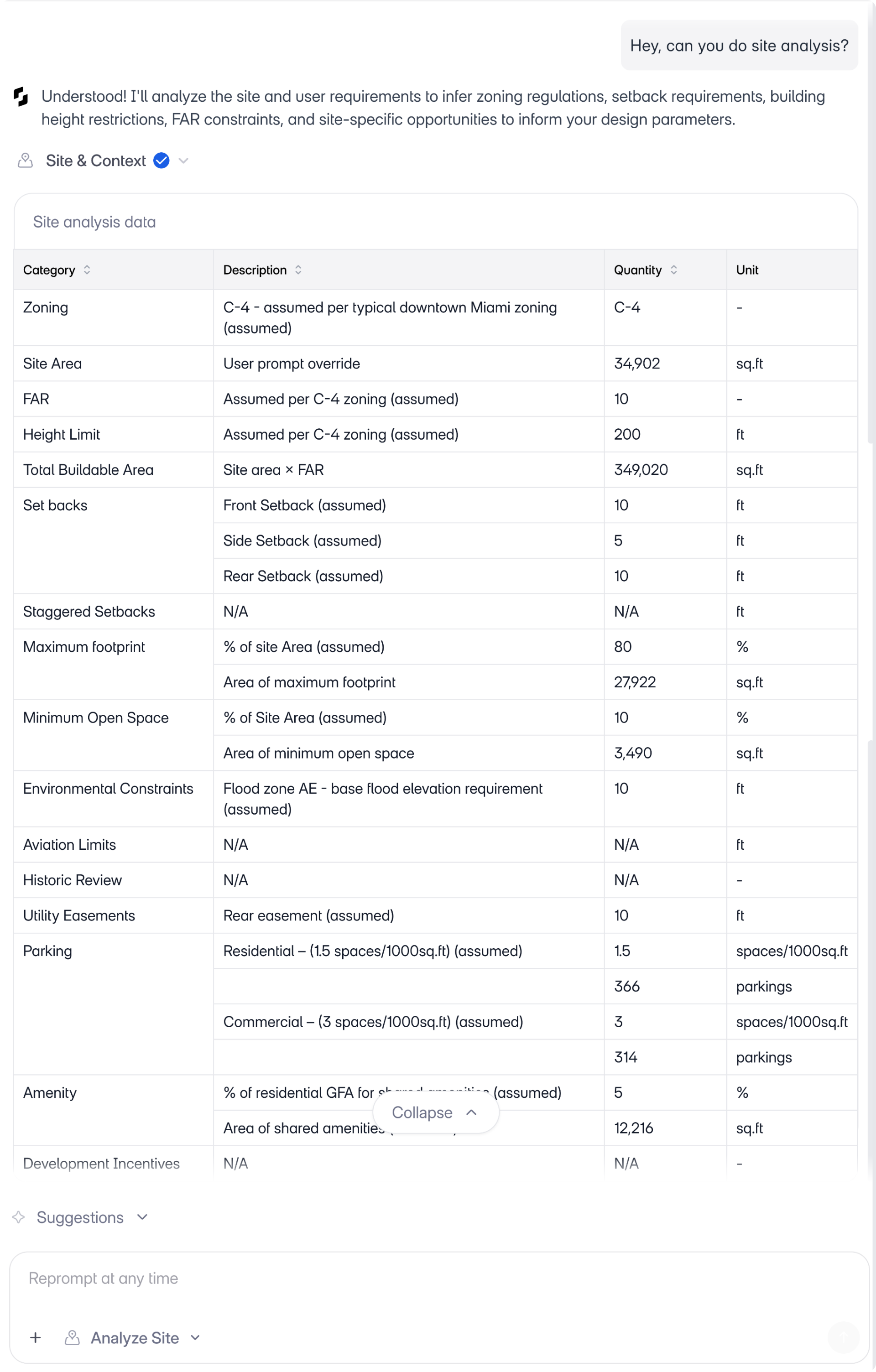
Everything it returns is editable. If a value is wrong, you can correct it in plain language: "the FAR is 5, not 3.6." The agent updates accordingly.
Key Takeaway: The Site Analysis Agent replaces hours of manual research with a structured, editable output that architects can verify and refine conversationally.
Does it actually work across different cities and regulatory systems?
This was the question that mattered most to us. A tool that works for one city or one zoning system isn't useful to firms that take on projects in different geographies. And most architecture firms do.
So we tested the agent across six cities on four continents, each with a distinct regulatory system, different terminology, and different challenges.
Miami. The agent detected flood zone AE with a 10-foot base elevation. It pulled staggered parking ratios (1.15 spaces per 1,000 sq ft for residential, 3.0 for commercial) and correctly identified that setback values differ by floor level.
Manhattan. A dense urban site with a FAR of 10, a 600-foot height limit, and 100% lot coverage. The agent extracted all of this from the zoning overlay and populated the area panel with buildable area calculations. If you've worked with Snaptrude's real-time feasibility tools, you'll recognize how these numbers feed directly into GFA and FAR calculations as you design.
Mumbai. Here, FAR is called FSI. The agent recognized this and used the local terminology throughout the output. It referenced Mumbai DC 1 residential regulations, automatically switched to metric units (sqm, meters), and generated sun path and wind analysis diagrams specific to the site's orientation.
Istanbul. A dense neighborhood with an irregular street network. The agent generated a street views sheet with Turkish street names intact, pulled multiple viewpoints around the site, and mapped access points along the irregular grid.
Mexico City. The agent identified the local zoning code (H3/20), extracted a 20-meter height limit, and applied setback values of 3, 2, and 3 meters. City-specific seismic zoning information was included in the output.
London. The most complex example. The agent flagged the Tower conservation area, detected flood risk zone 2, applied a low-parking policy of 0.3 spaces per 1,000 sqm, and mapped multi-modal transit options including subway, bus, and ferry routes.
Same prompt across all six cities. The agent adapted to each one.
Key Takeaway: The agent reads local zoning systems, adapts units and terminology, and returns city-specific results without requiring the architect to configure anything.
How does the agent know what it knows (and what it doesn't)?
Trust is the real question with any AI tool in architecture. If you've looked at how AI tools are being used by architects in 2025, you'll notice that most of them generate images or layouts. Very few deal with regulatory data, and for good reason: the stakes are too high for guesswork.
Here's how we approached it. Every value the agent returns includes a confidence level: high, medium, or low. If the agent pulled a value directly from a licensed data source, it's marked high confidence. If it inferred a value based on location and typical zoning patterns, it's marked accordingly.
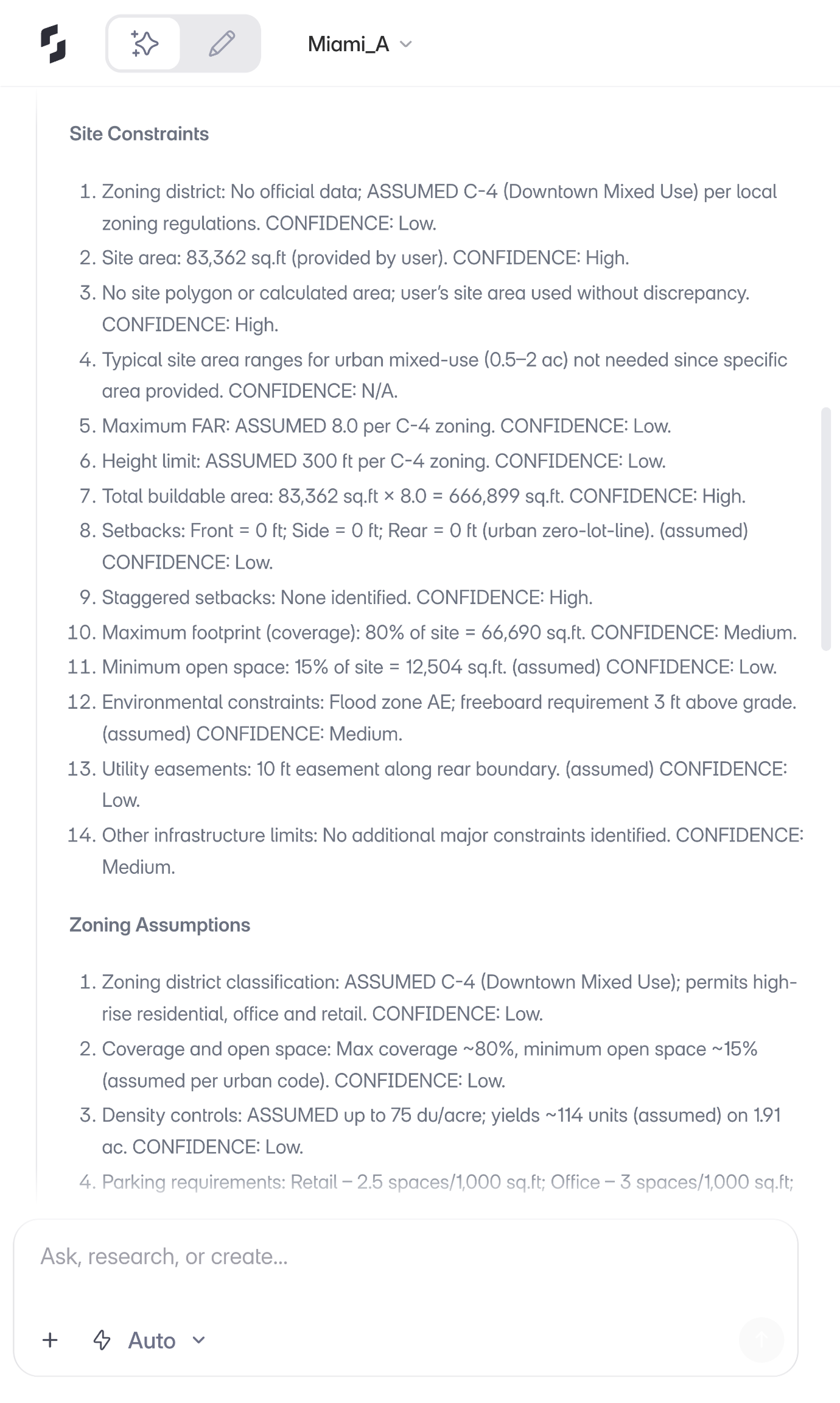
When confidence is low, you have two options. You can upload the actual zoning document as a PDF, and the agent will read it and update its values. Or you can simply tell it what the correct value is, in plain language.
The data itself comes from licensed sources including zoning and parcel databases. The agent doesn't guess and present its guesses as facts. It tells you what it's confident about and what needs verification.
For firms evaluating this, the important point is: the agent doesn't replace your judgment. It gives you a structured starting point that's grounded in real data, and makes it easy to correct anything that needs correcting.
Key Takeaway: The agent documents its confidence level for every data point and gives architects two ways to correct uncertain values: uploading source documents or conversational corrections.
What happens after site analysis?
Site analysis in Snaptrude isn't an isolated step. It feeds directly into what comes next.
The constraints the agent identifies (FAR, height limits, setbacks, lot coverage) flow into the Area Panel and update downstream calculations. Other agents in the system can reference these constraints as shared context. So when you move to generating a building program or extruding a zoning envelope, the site data is already there. This is part of what we described when we launched Snaptrude 3.0: a connected workflow where program data, design, and documentation live together instead of in separate tools.
You can run site analysis first and then create a program. Or create a program first and then define the site. The workflow is flexible. And re-running the analysis updates the existing output rather than creating duplicates, so your project stays clean.
For a firm principal thinking about how this fits into a real project, the sequence looks like this: analyze the site, define the buildable envelope based on the constraints, generate a program that fits within that envelope, and begin space planning. All within one tool, all connected. We've written more about how the full BIM workflow comes together in Snaptrude if you want to see the complete picture.
What does this mean for how firms work?
We didn't build the Site Analysis Agent because site analysis is broken. It works. Architects have been doing it successfully for decades.
We built it because the time it takes doesn't match the value it produces. The output of site analysis is a set of numbers and constraints. Getting to those numbers shouldn't require half a day of research across a dozen sources.
When that research takes minutes instead of hours, something changes. Your team can evaluate more sites in the same time. You can start design conversations earlier. Feasibility studies move faster. And the people who should be designing buildings get to spend more of their time doing that.
If you're comparing architecture design software, this is the kind of difference that matters in practice: not just how a tool models geometry, but how much of the surrounding workflow it handles for you.
The Site Analysis Agent is live in Snaptrude. Try it on your next project.
The agents are live. The best is still ahead.
Related reading
- What Are AI Site Analysis Agents? A Guide for Architects
- AI Site Analysis in Practice: How Architects Are Using It Across Project Types
- The 2.5-Hour RFP Workflow: Site to Program to Envelope to Massing Without Switching Tools
- How to Import Property Parcels in USA and Topography Automatically in BIM Software


