Last updated:
AI Agents for Architectural Programming: What They Do and Why We Built Them
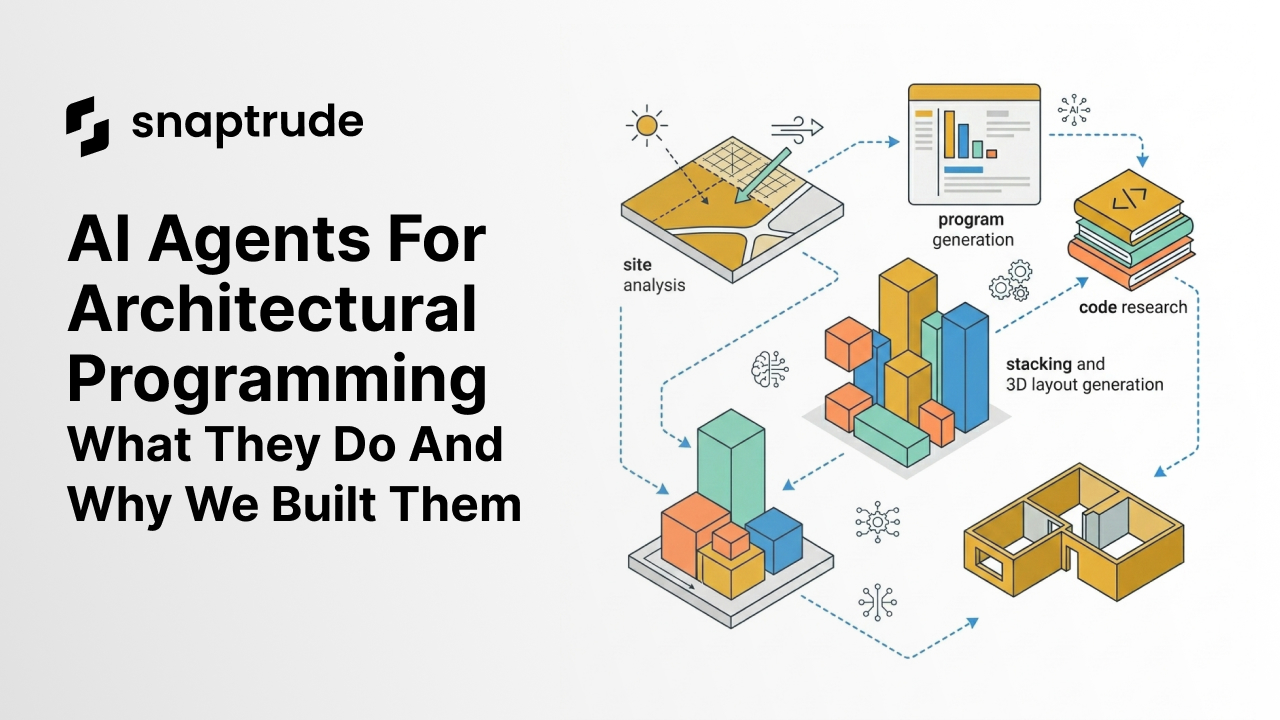
AI agents for architecture are software tools that handle specific, repeatable tasks in the design workflow: reading site constraints, generating architectural programs, researching building codes, assigning room dimensions, and organizing spaces into a 3D layout. Snaptrude's modular AI agents are built to work together, sharing context across steps so that output from one feeds directly into the next. Here's why they exist, and what each one actually does.
Why do architects spend so much time on work that isn't design?
There's a phase at the start of every project that doesn't end up in a portfolio. It happens before the design, before the model, before anything a client ever sees. And it consumes a disproportionate amount of time from the people best positioned to be doing real design work.
Here's the thing: the tasks involved in early-stage design prep aren't easy. They require architectural judgment. But they're also largely repeatable. Pulling site data from zoning portals and GIS platforms. Building a room-by-room program from scratch. Calculating ADA parking minimums. Stacking departments across floors based on adjacency logic. Updating area totals when the client changes the brief.
Every architecture firm does this work. Every firm does it manually, across multiple tools that don't talk to each other: spreadsheets, municipal websites, regulatory PDFs, custom Excel models. Context gets lost between steps. When something changes, a significant portion of the work starts over.
This is the problem we built Snaptrude's AI agents to solve. Not to automate architecture. To automate the parts that slow it down. Snaptrude 3.0 was built to connect these steps into one continuous workflow. The agents are what handle execution within that system.
The biggest time sink in early-stage design isn't design itself. It's the data work that precedes and supports it. Architects spend hours on tasks that require judgment but follow repeatable logic. That's where AI agents can genuinely help.
What are Snaptrude's AI agents and how do they work together?
Snaptrude's AI agents are modular. Each one is built to do one specific job really well. They share context with each other, so the output of the site analysis agent feeds directly into the program generator, which feeds into the dimension assignment and 3D layout. You can run them individually, in sequence, or chain them based on what your project needs.
This matters because early-stage design is never a single transaction. Briefs change. Site analysis reveals constraints you didn't account for. A department gets added two weeks in. Modular agents let you update one part of the workflow and see changes propagate downstream, without starting over.
Here's what each agent does and why it matters.
Does site analysis really take that long? Why is there an agent for it?
Yes. And it's one of the most common frustrations we hear from project architects and firm leads.
Before a team can make any real design decision, someone has to establish what's actually possible on the site: the zoning classification, FAR, setbacks, buildable area, height limits, climate data, and surrounding context. In a traditional workflow, that means pulling from municipal GIS portals, cross-referencing zoning maps, checking state and local codes, and piecing it together manually. It takes anywhere from half a day to two full days depending on the site and jurisdiction.
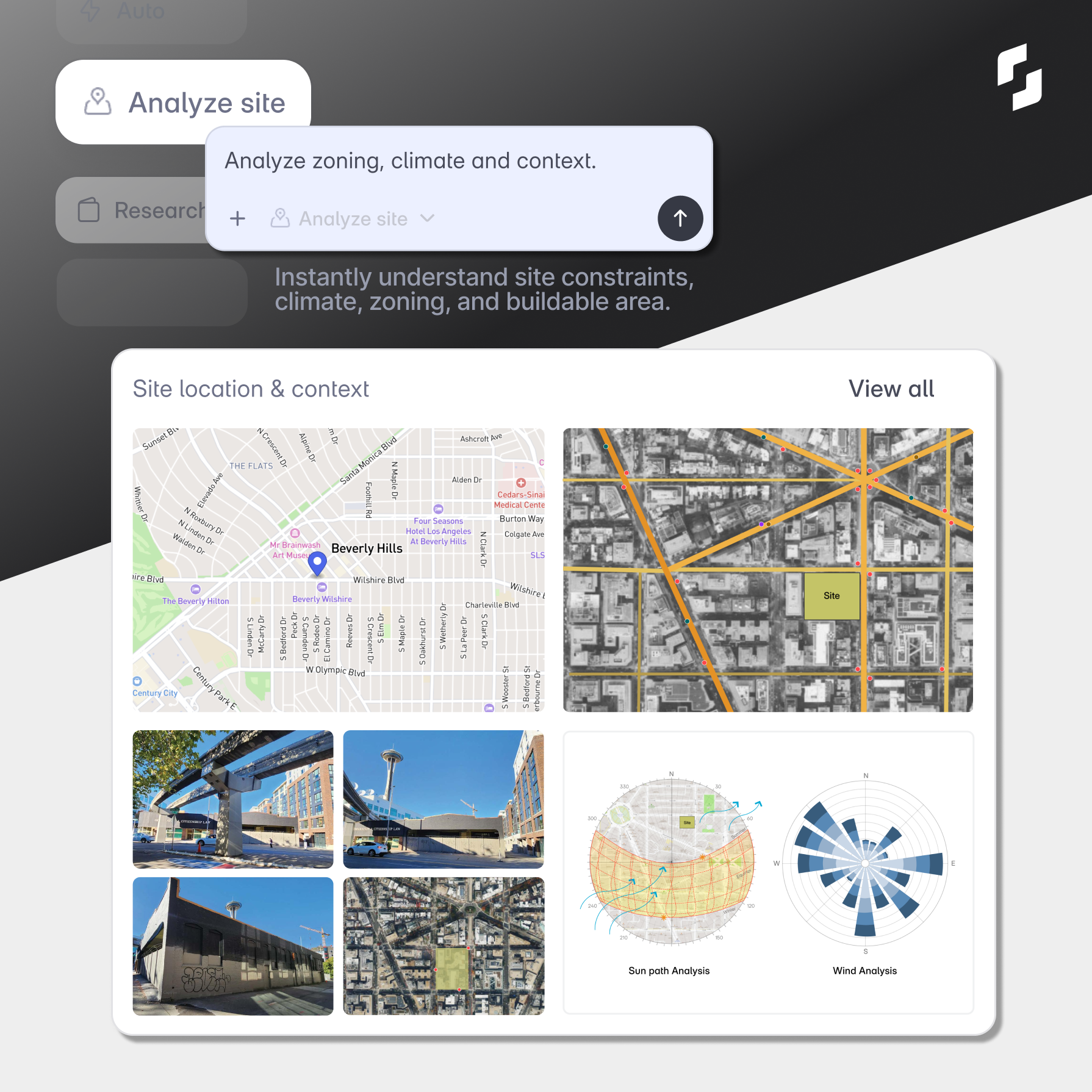
The Site Analysis agent reads a location and returns zoning parameters, climate data, site area, FAR, setbacks, and buildable area in seconds. The output is structured and connects directly to the program generator so no context gets lost when you move to the next step. You get a sun path analysis, wind analysis, and satellite context all in one view.
Site analysis is where most projects lose their first full day. The Site Analysis agent compresses that to seconds and passes the data directly to the next step in your workflow.
How does the Research agent handle building code questions?
The Research agent answers code and regulation questions in plain language, specific to your project location and typology.
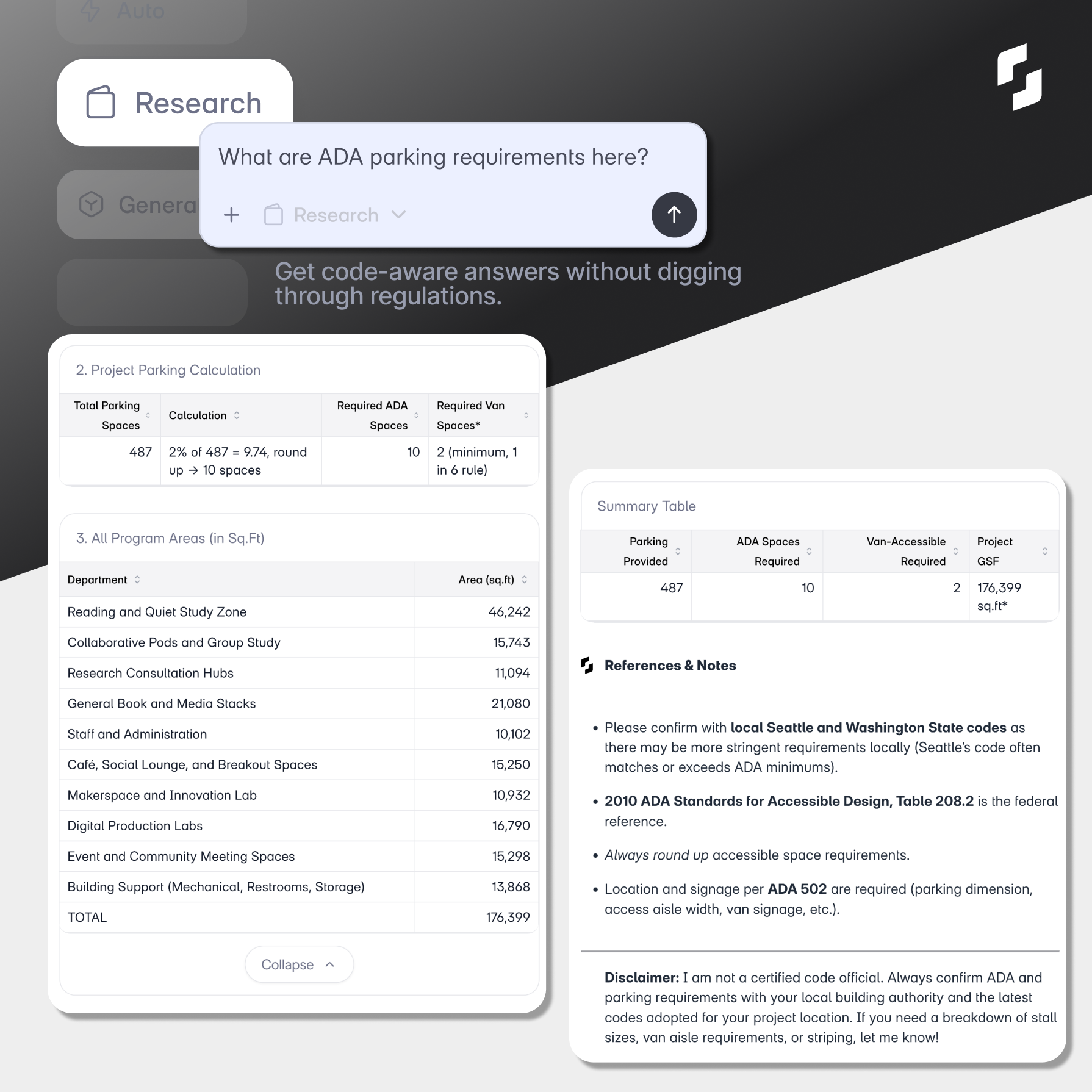
Ask it about ADA parking requirements for a 487-space surface lot in Seattle, and it returns the calculation, the applicable federal standard (2010 ADA Standards for Accessible Design, Table 208.2), a note that Seattle's local code may require more than the federal minimum, and a clear disclaimer to verify with your local building authority. It cites its sources. It tells you what it can and can't confirm.
Architects spend real hours on this kind of lookup. Not because the regulations are impossible to find, but because finding, reading, applying, and cross-referencing them across multiple documents for every project adds up. The Research agent doesn't replace your judgment on code compliance. It simply removes the time it takes to get to the starting point.
The Research agent gives you code-aware answers with citations, specific to your project location. It gets you to the right starting point faster, so you can spend time on the interpretation rather than the lookup.
What does "generate an architectural program" actually mean?
An architectural program is the complete list of spaces a building needs: every department, every room type, with area targets and quantities. Creating one from a project brief is time-consuming because it requires applying the right benchmarks for the building typology, running occupancy calculations, and making sure the total program fits within the buildable area established by the site analysis.
The Generate Program agent does this from a single brief. Give it a building type, a site, and a capacity target, and it returns a department-by-department breakdown with space-level area allocations, applying the correct occupancy models and area ratios for the typology automatically.
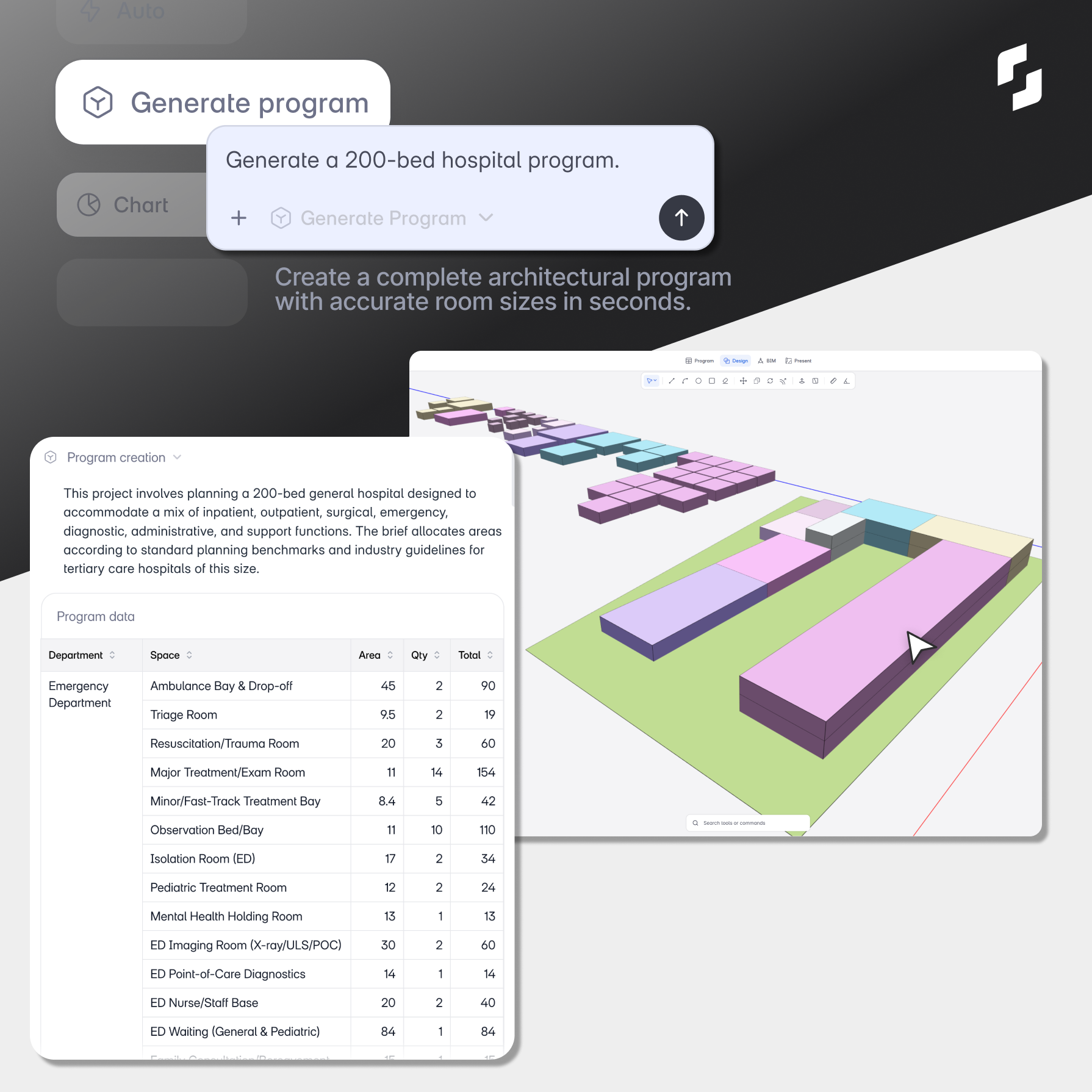
For a 200-bed hospital, that means ambulance bays, triage rooms, trauma bays, exam rooms, observation beds, isolation rooms, pediatric treatment rooms, imaging suites, and every other department, each with area, quantity, and total square footage. All generated in seconds. All editable.
This is where teams tell us they save the most time. Not because the output is final, but because it gives everyone a credible starting point to react to instead of a blank page.
The Generate Program agent turns a project brief into a complete, typology-accurate architectural program in seconds. It's a starting point, not a finished product, but it's a smart starting point you can actually work from.
Can AI really assign room dimensions that meet architectural standards?
The Assign Dimensions agent takes your program and applies realistic, standards-based dimensions to every space. It accounts for structural grids, proportion, circulation clearances, furniture requirements, and functional needs for each space type.
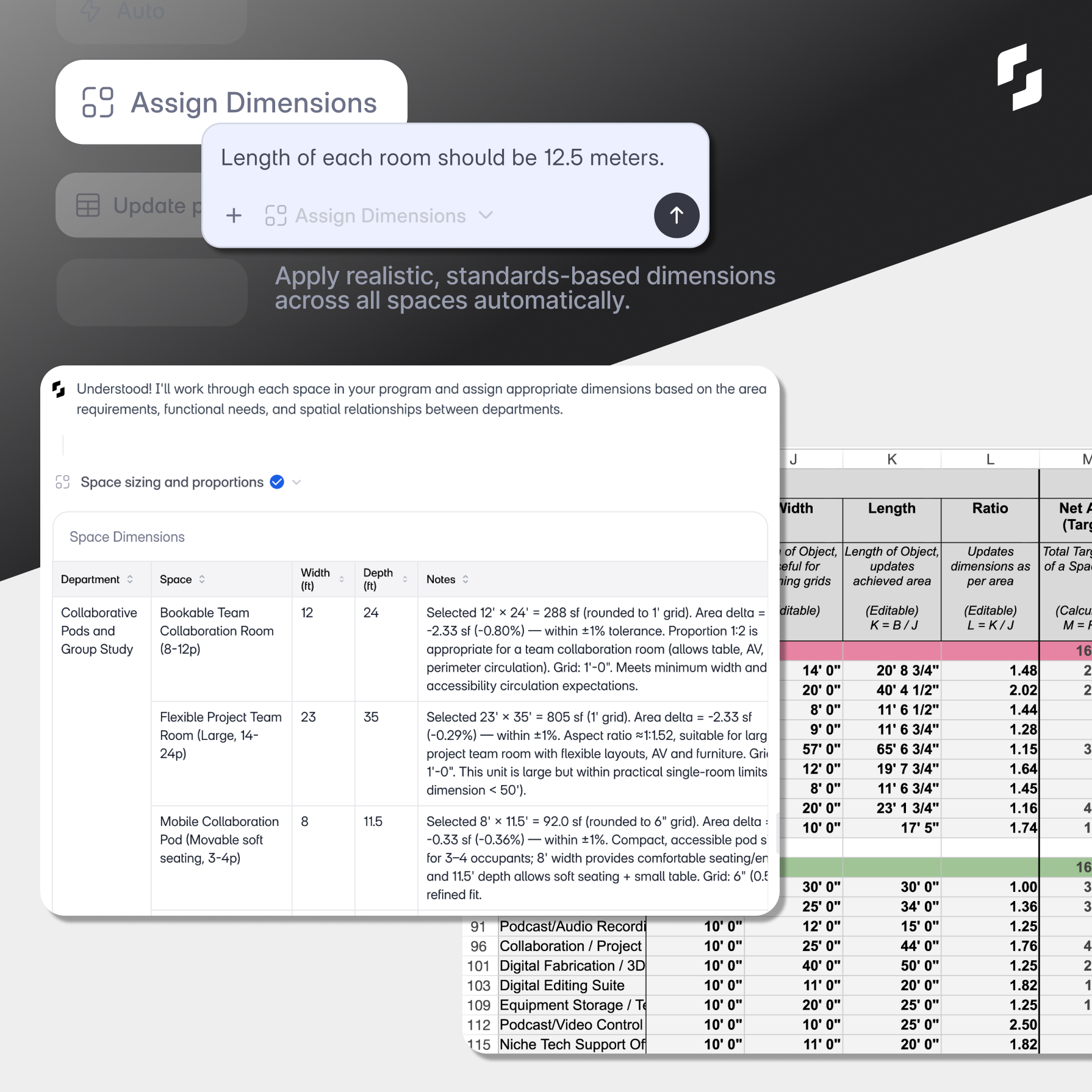
The logic is the same logic a senior architect applies manually. For a 12-person team collaboration room, it selects 12' x 24', documents the reasoning (proportion is appropriate for a table with AV, width meets accessibility minimums, grid fits 1'-0" module), and flags the area delta from the program target. It does this across every space in the program.
Doing that manually for a 200-space program can take a full working day. The agent does it in minutes.
The Assign Dimensions agent applies architectural judgment to room sizing at scale. It's not a simple calculator. It reasons about proportion, function, and standards, the same way a project architect would.
What happens when the brief changes mid-project?
This is one of the most reliable time sinks in early-stage design. A client wants to increase circulation areas by 15%. In a traditional workflow, someone opens the spreadsheet, finds every circulation space, updates the areas, recalculates totals, and checks that the overall program still balances. If the spaces are live-linked to a 3D model, the model has to be updated too.
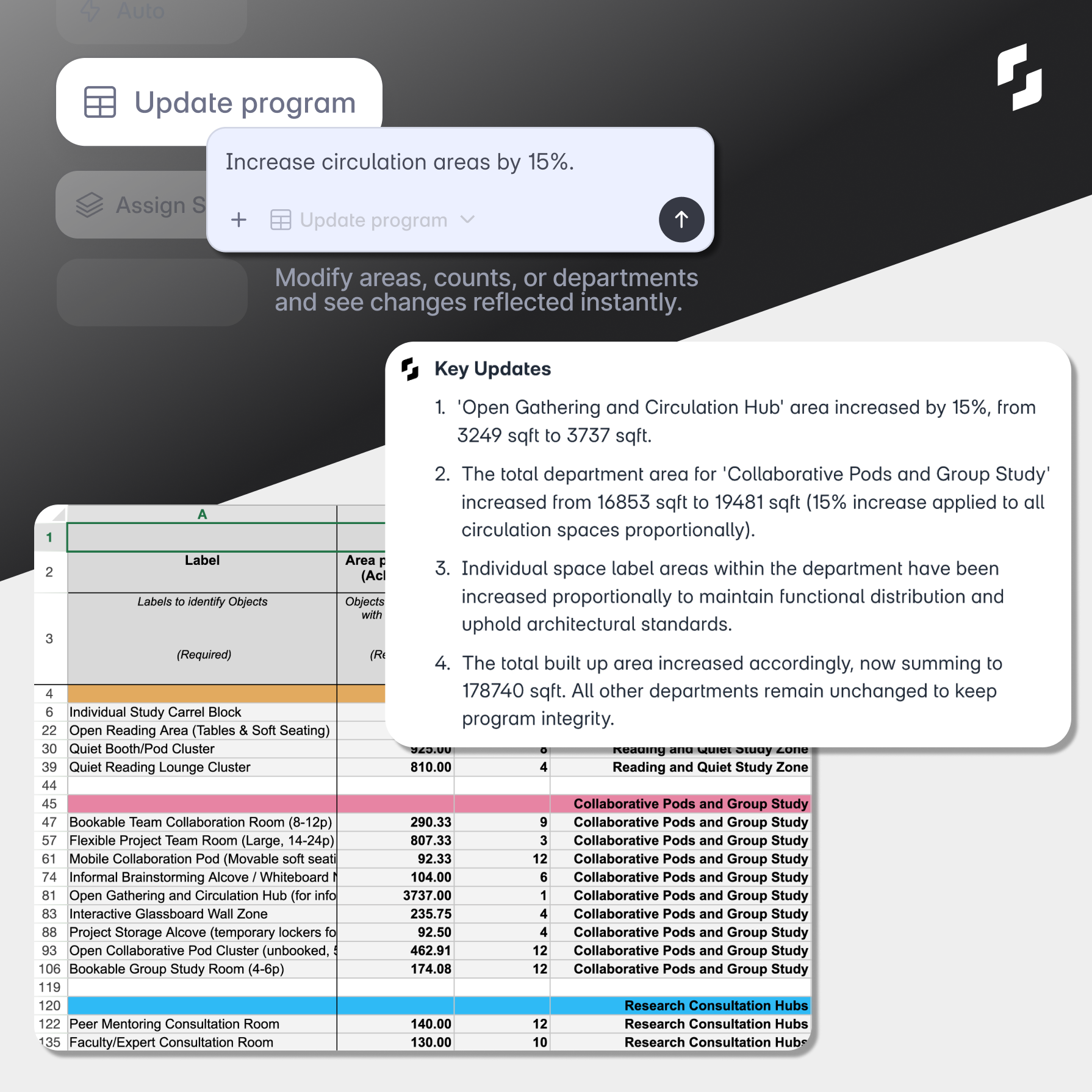
The Update Program agent handles this by instruction. Type "increase circulation areas by 15%" and it recalculates every affected space proportionally, updates the total built-up area, and gives you a numbered summary of exactly what changed and why. No manual spreadsheet work.
Paired with the Chart agent, which generates an area distribution visualization on demand, you can show a client an updated program breakdown in minutes rather than hours.
The Update Program and Chart agents handle scope changes without a manual rebuild. You make the call on what changes. The agents handle the recalculation and the visualization.
How does the Query agent use your firm's past projects?
Most architecture firms have accumulated useful knowledge over years of practice: area benchmarks by typology, internal program standards, lessons learned from past projects. That knowledge lives in old project folders, PDFs, and the heads of senior staff. It's rarely accessible in the moment you need it.
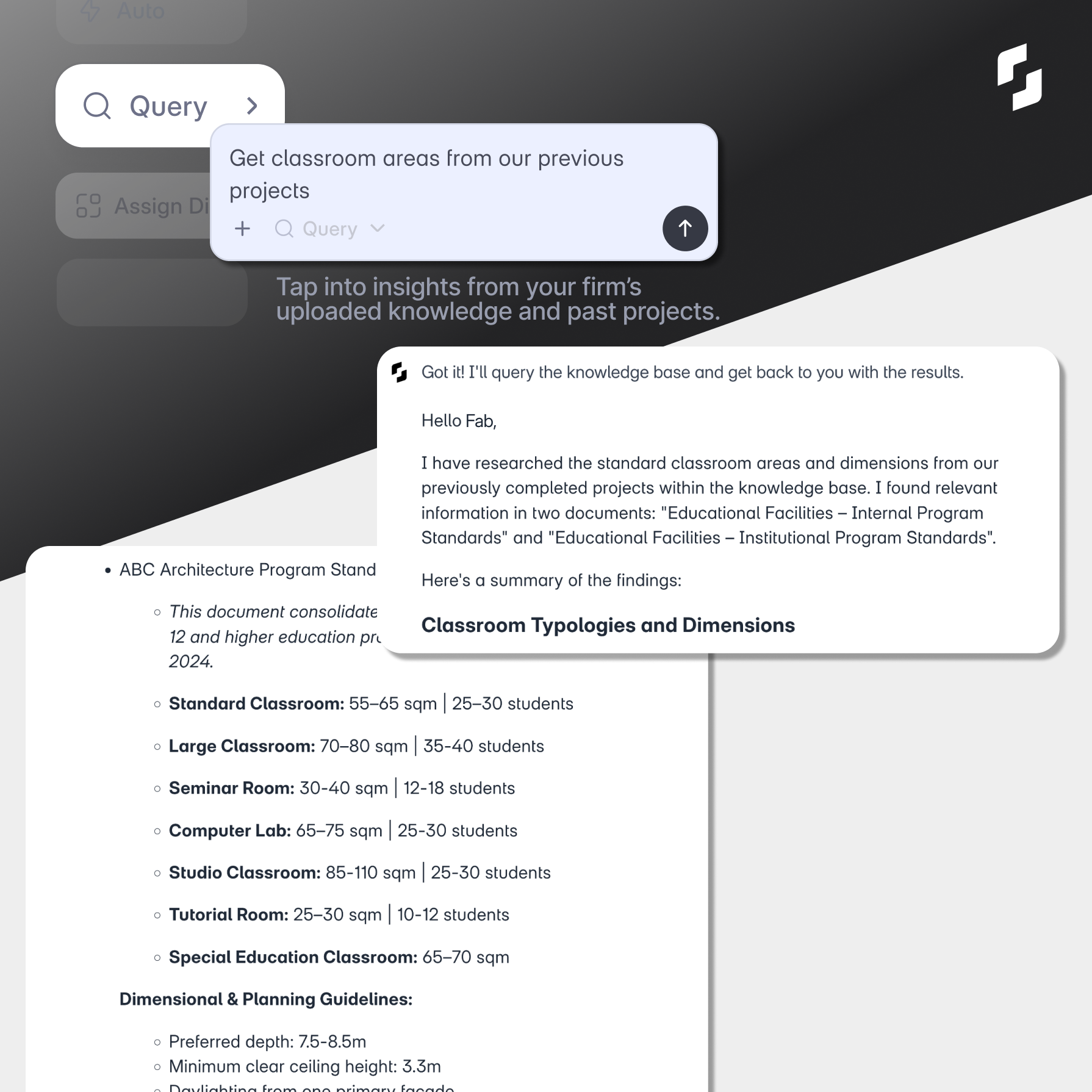
The Query agent pulls from your firm's uploaded knowledge base. Ask it for classroom area benchmarks from previous educational projects and it searches your documents and returns structured results with source references. It's the difference between institutional knowledge that's technically there and institutional knowledge you can actually use.
This is especially relevant for firms with private enterprise access to Snaptrude AI, where your firm's data stays ring-fenced from other tenants.
The Query agent makes your firm's accumulated knowledge accessible during live project work, not just after a long file hunt.
How do departments get organized across floors?
The Assign Stories agent takes your program and distributes departments across floors, applying adjacency logic and functional stacking rules appropriate to the building type. It generates a floor-by-floor table and a 3D massing view showing how departments stack, with area figures per story and the adjacency reasoning behind each placement.
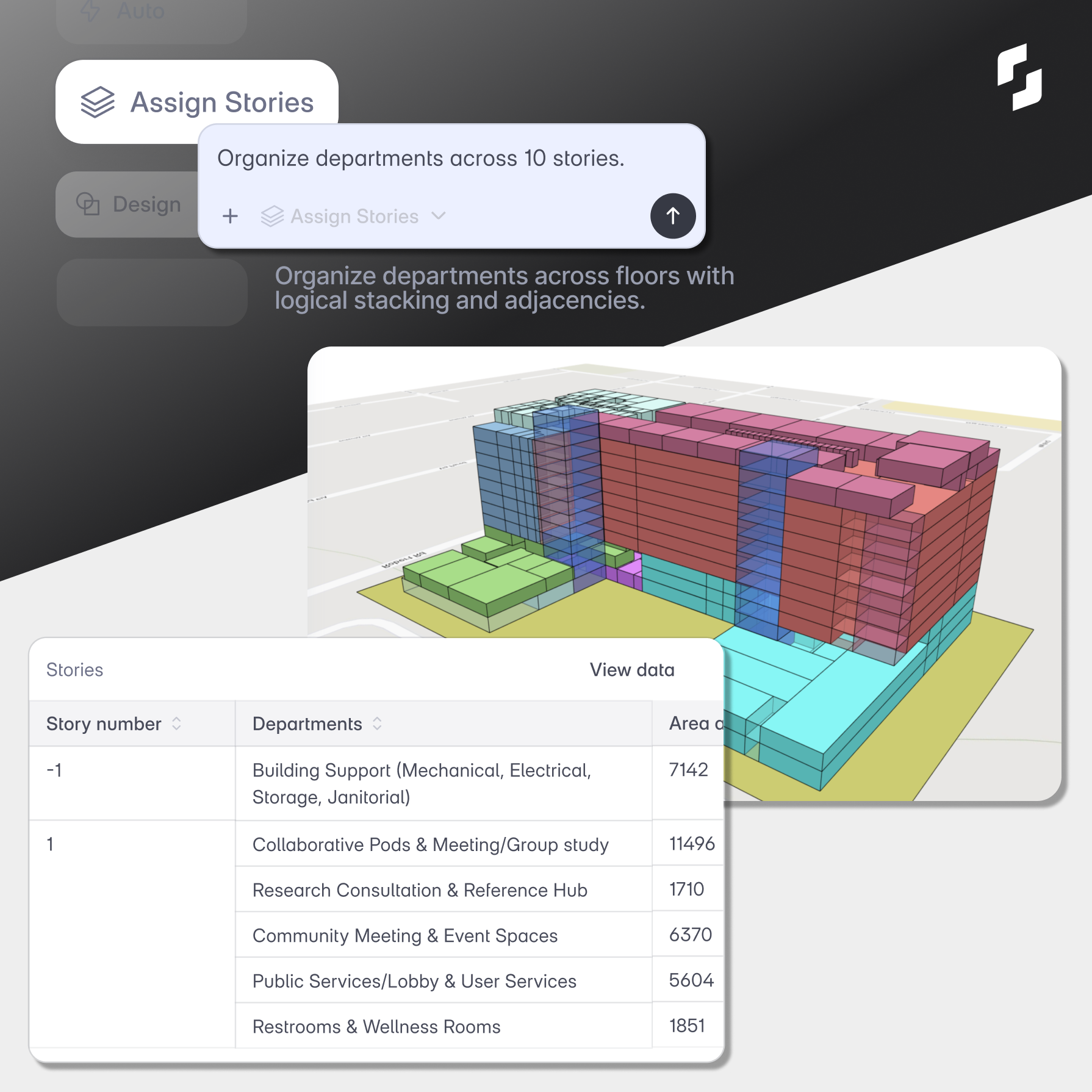
This then feeds directly into the Design agent, which generates a 3D layout with live-linked spaces. Every space in the Snaptrude model is connected to its area data in the program. Change the program, the model updates instantly. This is the same live-link between program and design that Snaptrude 3.0 was built around.
The agents also work alongside Snaptrude's interoperability: once you have a layout you're happy with, you can export to Revit or Rhino without losing data. The AI handles early-stage execution. Your existing documentation tools handle what comes next.
The Assign Stories and Design agents take a flat program and turn it into a stacked, organized 3D layout with live data connections. What used to take days of manual coordination now takes minutes.
What this means for principals and design leaders specifically
If you're running a practice, the value here isn't only speed. It's about where your senior architects' attention actually goes.
When a project architect spends two days assembling a program or chasing down code answers, that's time not spent on design quality, client conversations, or working through a difficult site condition. These are the things that actually require deep experience. The agents handle the parts of the workflow where the bottleneck is time and access to the right information, not expertise.
That's a different value proposition than "AI makes you faster." It's about protecting the work that only experienced architects can do, and giving junior architects a better foundation to learn from.
If you want to see how this works on a real project, try Snaptrude AI with an actual brief. If you're a student or early-career architect, Snaptrude's education program gives you full access for free.
The agents are live. The workflow is connected. The best is still ahead.
Related reading
- Top 18 AI Tools for Architects in 2026
- Why AI in Architecture Feels Like More Work, Not Less (And What We Did About It)
- AI Space Planning: Design Departments Before Room Details
- 15 Questions You Can Ask Snaptrude's Research Agent (Instead of Opening a Browser Tab)
Frequently Asked Questions


